Catch budget breaches
before they happen.
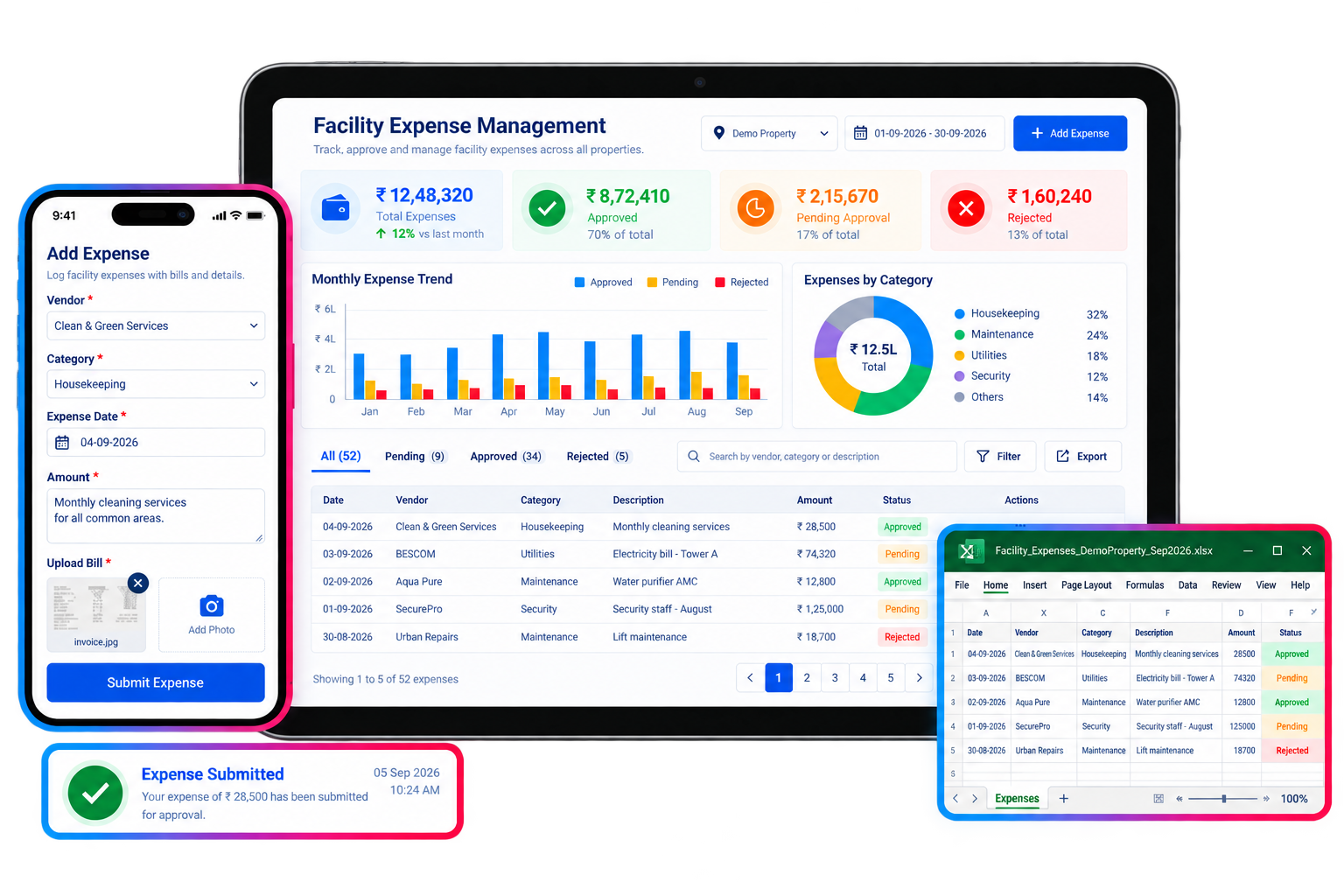
Facility Expense Automation ERP replaces manual bill tracking and static spreadsheets with policy-driven budget caps, maker-checker approvals, and audit-ready journals posted straight to your general ledger.
Policy-driven
Budget caps
Auto
Ledger posting
Live
Breach alerts
Companies Using Firmity
Join hundreds of facility managers transforming their operations

























Everything your finance team needs to control facility spend.
Expense Bill Capture
Attach PDF bills directly to each expense entry — no lost paperwork or separate filing system.
Category & Cost-Center Tracking
Every expense is tagged by category and cost center or location for clean, comparable reporting.
Budget Creation & Alerts
Set category-wise budget caps and get alerted before spend crosses the line, not after.
Approval Workflow
Every expense routes through a defined approval chain before it's paid — no email chasing.
Recurring Expense Management
Set up recurring bills once and let them post automatically each cycle without re-entry.
Expense Analytics & Trends
Track spend trends across properties and catch anomalies early with a consolidated dashboard.
Every field an expense needs, grouped the way your team works.
The 15 fields below are the same feature set listed on the Features page, organized here into the three stages an expense actually moves through — capture, control, and reporting.
Capture & categorization
Every expense starts as a structured, documented entry — not a loose receipt waiting to be reconciled later.
- Expense Bill PDF Attachment
- Expense Categorization
- Cost Center/Location-wise Tracking
- Multi-property Expense Tracking
- Recurring Expense Management
Budget & approval control
Spend is checked against a category budget and routed for sign-off automatically, before money moves.
- Budget Creation & Alerts
- Expense Approval Workflow
- Vendor/Bill Payment Tracking
- Centralized Expense Dashboard
- Expense Tracking
Reporting & audit
Month-end reporting is a review of data already captured, complete with a full trail for auditors.
- Expense Analytics
- Expense Trend Analysis
- Expense History & Audit Trail
- Export to Excel Sheets
- Expense Reports
Contact Us for a Walkthrough
Tell us about your requirements and we will get back to you within 24hrs.
What a month of facility spend looks like with Facility Expense Automation ERP.
Original walkthrough for this build — no new numbers, just the sequence the capabilities above add up to.
A bill comes in
A vendor invoice for HVAC servicing is logged with its PDF, category, and cost center attached — no separate filing step.
Approval routes automatically
The expense moves to the right approver based on its category and amount, without anyone forwarding an email.
A budget cap flags early
Housekeeping supply spend crosses most of its monthly cap. The alert fires before the category goes over budget, not after.
A recurring bill posts itself
The month's internet and AMC bills, set up once as recurring expenses, post automatically without re-entry.
The ledger is already reconciled
Every approved expense has already posted to the general ledger, so month-end close is a review, not a data-entry exercise.
Works well with
FAQ
Quick answers to what teams evaluating Facility Expense Automation ERP ask most.
Each expense category carries its own budget cap. As spend is logged against a category, Firmity compares it to the cap in real time and alerts before the category is breached, rather than reporting an overrun after the fact.
Ready to see facility spend before it becomes a problem?
Facility and property management teams use Firmity's Facility Expense Automation ERP to enforce budget discipline, cut approval delays, and keep every expense audit-ready.
