Stop reacting to breakdowns.
Automate every task.
Facility Task Automation replaces spreadsheets, whiteboards, and WhatsApp reminders with one scheduling engine that assigns work, tracks completion, and keeps an audit-ready record — automatically, from setup to sign-off.
40%
Reduction in emergency repairs
3x
ROI within 12 months
100%
Audit-ready compliance log
Companies Using Firmity
Join hundreds of facility managers transforming their operations
















What is Facility Task Automation?
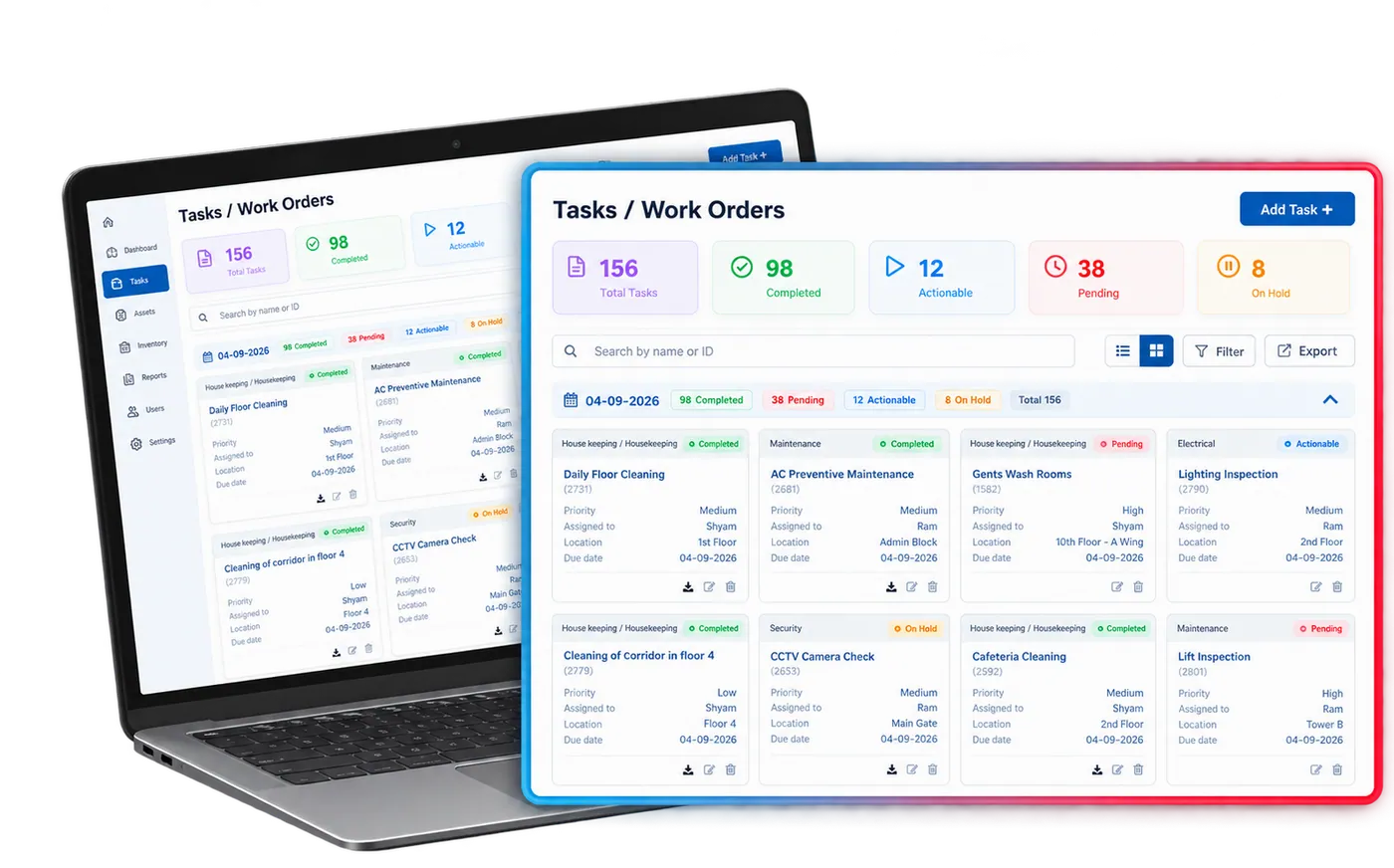
Facility Task Automation is Firmity's planned preventive maintenance module. It lets facility teams create recurring tasks with custom frequencies, assign them to technicians and track every task from schedule to sign-off in one system, instead of spreadsheets, whiteboards and WhatsApp reminders. Each task can carry a digital checklist, before and after photos, a priority, a location and remarks, and QR tagging lets a technician open the right task by scanning the equipment. Automated triggers create work orders on schedule and send real-time status updates, so supervisors no longer chase follow-ups by hand. Every completed task leaves a timestamped record, which builds an audit-ready history that managers can filter and export. Because Firmity is one connected platform, the module shares live data with the asset, complaint, inventory and workforce modules rather than keeping its own copy. It is used for buildings, campuses, plants and residential communities.
Everything your maintenance team needs.
Automated Schedule Generation
Define intervals once — daily, weekly, monthly, or by usage meter. Firmity auto-generates and assigns work orders without manual input.
Multi-Channel Alert Engine
Push, email, and in-app notifications fire days before a task is due. Escalation chains ensure nothing slips past your team.
Digital Work Orders
Each task ships as a structured work order with checklist steps, assigned technician, parts list, and photo-upload fields.
Field Technician App
Technicians update task status, capture evidence photos, and log time from the field — offline-capable and mobile-first.
Maintenance Analytics
Track completion rates, average resolution time, cost-per-task, and downtime trends. Exportable reports for management review.
Compliance Audit Trail
Every completed task is timestamped and logged. One-click audit exports prove maintenance compliance to regulators or insurers.
Every field a task needs, grouped the way your team works.
The 20 fields below are the same feature set listed on the Features page, organized here into the four stages a task actually moves through — setup, scheduling, field execution, and reporting — so it's clear where each capability fits into the day-to-day workflow.
Task setup & categorization
Every task starts from a structured definition, not a free-text note — so the same category always reports the same way later.
- Task Category
- Task Sub-category
- Task Description
- Task Location
- Task QR Tagging
Scheduling & assignment
Frequency, shift, and repetition rules generate the calendar once and keep regenerating it — technicians get a queue, not a memory test.
- Task Frequency
- Multiple Task Shifts
- Task Repetitions
- Task Date/Date Range
- Task-Employee Assignment
Field execution
Work happens on the app the technician already has open — checklist, timing, and messaging live next to the task, not in a separate channel.
- Digital Task Checklist
- Before/After Task Images
- Task Timings
- In-built Task-wise Messaging
- Task Priority
Reporting & oversight
Status, remarks, and filters turn into a report a supervisor can export in one click — no manual collation at month-end.
- Task Status
- Task Remarks
- Task Filters
- Export to Excel Sheets
- DMR Report
Contact Us for a Walkthrough
Tell us about your requirements and we will get back to you within 24hrs.
What a week with Facility Task Automation actually looks like.
Original walkthrough for this rebuild — no new numbers, just the day-to-day sequence the capabilities above add up to.
The week's calendar is already built
Every recurring task due this week — HVAC filters, fire alarm checks, generator servicing — was generated automatically over the weekend, based on the frequency rules set up once per asset. No one opened a spreadsheet to make it happen.
A technician gets a due-today alert
A push notification lands on the field app with the work order, checklist, and location attached. The technician marks steps complete and attaches a before/after photo directly from site — no separate report to file later.
A usage-based trigger fires early
A generator crosses its running-hours threshold ahead of its usual monthly slot. Because the schedule is usage-based, not just calendar-based, the work order is raised the same day the threshold is crossed, not weeks later at the next scheduled check.
A supervisor reviews the exception queue
One task is marked overdue. The escalation chain has already notified the site manager, and the task's remarks field shows the technician noted a missing part — visible without a phone call.
The compliance export takes one click
Month-end reporting is a DMR export, not a data-entry exercise — every task's status, timestamps, and technician sign-off are already logged, ready to hand to an auditor or insurer.
Works well with
FAQ
Quick answers to what teams evaluating Facility Task Automation ask most.
A to-do list has to be filled in by someone every time. Facility Task Automation generates the calendar itself from the frequency rules you set once per asset, assigns it to the right technician automatically, and keeps a timestamped record of every action — nothing depends on someone remembering to update a sheet.
Ready to eliminate reactive maintenance?
Facility teams use Firmity's Facility Task Automation to cut emergency repair costs, extend asset life, and stay fully compliant — without the spreadsheets.
