Visitor Management
What Is a Visitor Management System? A Complete Guide for Any Organization
· 10 min read
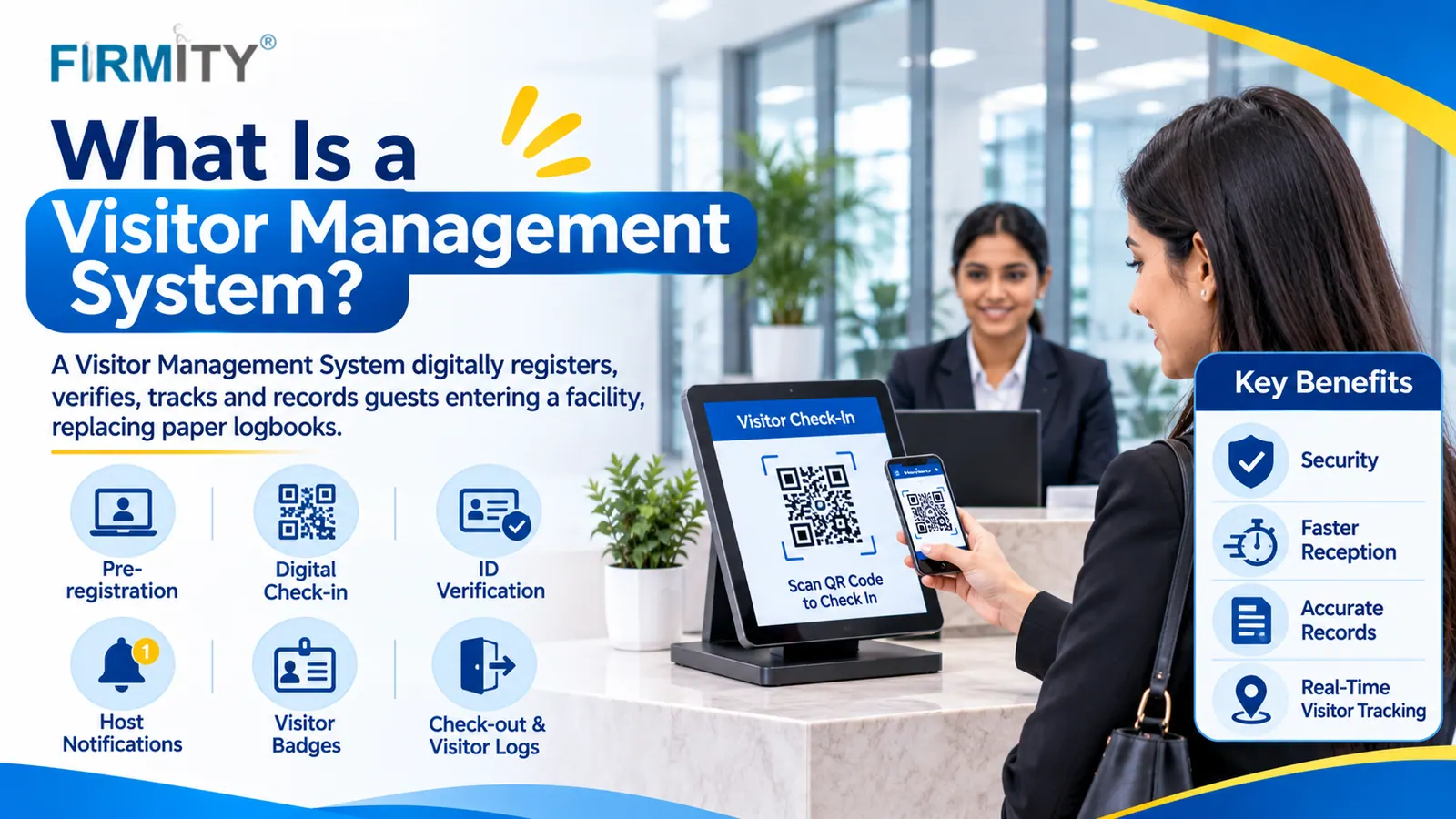
What is a visitor management system? It's a digital system that registers, verifies and tracks everyone who visits a site, replacing the paper register with a searchable record. It tells you who is on site, who they came to see and when they left.
Most places still start with a notebook at the gate, and for a while that works. Then someone needs to know who visited last Tuesday, or whether a guest was ever approved, and the notebook has no answer. That's the gap that visitor management software fills, by turning every visit into a record that anyone with access can search. This guide explains how these systems work, what to look for and who benefits most, in plain language and for any kind of site.
A quick note on how this was put together. We looked at how sources such as Kisi, Envoy and Avigilon explain visitor management, and noticed that many lean towards corporate lobbies and security hardware. So we've kept the explanations broad enough for offices, schools, estates and factories. Firmity is our product, so it gets one short, clearly labeled mention near the end.
What Is a Visitor Management System?
A visitor management system, often shortened to VMS, is the process and the tools you use to keep track of everyone who enters your site. That includes guests, contractors, delivery staff, interview candidates and anyone else who isn't a regular member of your team. Instead of writing in a book, visitors register digitally, the host is told they've arrived and the visit is recorded from start to finish.
It helps to know what a VMS is not. It isn't the same as access control, which decides who can open which door, though the two can work together. And it isn't the same as employee attendance, which tracks your own team's presence. A VMS focuses on outsiders, and the question it answers is simple: who is here, who approved them and when did they leave?
How a Visitor Management System Works: One Visit, Start to Finish
The easiest way to understand a VMS is to follow one visit. A visitor arrives and registers, usually by scanning a code, using a front-desk device or giving their details to a guard. The system notifies the person they've come to see, and that host approves or declines the visit. Once approved, the visitor is let in, and the time of arrival is logged.
When the visit ends, the visitor checks out, either by a guard recording it or by scanning again. The system then closes the record, with the purpose, host and times all saved. Later, you can search that record by name, date or department. The whole process is a small automation of what the paper register tried to do, with the big difference that nothing gets lost. Firmity's own approach to this flow is covered in more detail under visitor management automation.
Key Components : Visitor Management systems
Most visitor management systems share a few building blocks, though the exact setup varies by site. Here's what you'll usually find:
The software: the central system that stores visits, rules and records.
A check-in point: a front-desk device, a gate guard's screen or a QR code visitors scan.
Host notifications: alerts by email, SMS or an app so the right person knows a guest has arrived.
A visit log: a time-stamped record of who came, whom they saw and when they left.
Optional badges: some sites print visitor badges, while others rely on digital records alone.
You don't need every component on day one. A small site might only need a check-in point, host alerts and a log. Larger or more security-sensitive sites often add badges and other extras. Start with the basics and grow into the rest.
Key Features: Visitor Management systems
When you compare visitor management systems, a handful of features tend to matter most. Look for digital registration that captures the visitor's details and, where useful, a photo. Look for host notifications and an approval step, so nobody enters without a green light. Check-in and check-out tracking give you a complete record, and visit history lets you search past visits.
Reporting is the quiet hero. A dashboard showing who's on site now, plus exports for security or front-desk review, saves a lot of time. Finally, check how easy the system is for the person at the gate, because it only works if they use it comfortably every day. A tool that's lovely for managers but clumsy for guards won't survive long.
Benefits of a Visitor Management System
The benefits show up fast. Security improves because entry follows a process, with a host approving each visit instead of a guard guessing. Accountability improves too, since every visit leaves a record that shows who came and who agreed to see them. In an emergency, knowing who is on site matters a great deal.
There's an everyday benefit as well. Check-in gets faster and smoother, and hosts stop wondering whether their guest has arrived. Records become searchable, so questions like "who visited last week?" take seconds. Over time, you also learn patterns, such as when visitors cluster, which helps staffing and planning.
Curious What Visitor Registration Looks Like With Your Own Setup?
It's easier to judge a visitor system when you can see your own gate or reception in it. If your visits are still logged on paper, you can book a free demo and see how Firmity handles registration, host approval and check-out for a site like yours. Tell the team how visitors arrive today, and they'll reply within 24 hours.
Types of Visitor Management Systems
There are three broad types, and they've been around in roughly this order. The oldest is the pen-and-paper register, which costs almost nothing but offers no search, no alerts and no check on who approved a visit. Next came on-premise software, installed on your own computers, which gives you control but needs upkeep.
The most common today is cloud-based software, hosted online and used through a browser or app. It's quick to set up, works across several sites and is updated by the vendor. For most organizations, cloud is the sensible starting point, though sites with strict data rules may prefer on-premise. We'll cover each type in more depth in a dedicated guide.
Visitor Management Software vs Paper Register
Capability | Paper register | Visitor management Software |
|---|---|---|
Registering a visitor | Handwritten entry at the gate | Typed or scanned in, often with a photo |
Checking the host agreed | A quick call, or simply assuming it's fine | A recorded approve or decline step |
Finding past visits | Paging through old entries by hand | Look up by name, date or department |
Knowing who's on site | Guesswork | Instantly see everyone currently on the premises |
Keeping records safe | Pages easily get lost or worn out | Held digitally, with access you can limit |
The paper register isn't evil, and it can be fine for a very small site with a handful of visitors. The trouble starts when volumes grow or when someone needs an answer. That's usually the moment people reach for software. We'll expand on this comparison in its own guide.
Who Needs a Visitor Management System?
Almost any site with regular outside visitors can benefit. Offices use it to welcome guests and keep track of who's in the building. Schools and campuses use it to control who enters and to know who is on the premises. Residential estates use it to log guests, deliveries and service staff at the gate.
Factories and industrial sites rely on it to record contractors and suppliers, often with notes on items carried in and out. Hospitals and clinics use similar systems to manage visitor flow. A simple test: if you ever need to know who visited, who approved them or when they left, a VMS is worth a look. If you only get a visitor now and then, a paper log may do for now.
Privacy and Data Protection
A visitor system collects personal data, such as names, contact details and sometimes photos, so privacy deserves attention. Collect only what you need, tell visitors why you're collecting it and keep it only as long as it's useful. Rules about visitor data differ from country to country, so check what applies where you operate.
It's also worth asking vendors how they protect your data. ISO/IEC 27001 is the best-known international standard for managing information security, and asking whether a vendor follows its approach is a reasonable question. Look for access controls, sensible retention settings and clear answers about where data is stored. A system that keeps visitor records safe is part of doing this properly.
Where Firmity Fits In
Since we've covered how visitor management works, here's a short, honest mention. Firmity's visitor management software is an affordable option for teams that want digital visitor control without a heavy enterprise system, and the team can quote for your setup. Visitors register by scanning a property or gate QR code, choose a department and are captured with a photo. The host is notified by email and SMS, and entry is granted only after the host approves. Check-in and check-out are tracked, and every visit is saved with its purpose, contact person, items carried and times, searchable by date range, with a dashboard you can export.
How to Choose a Visitor Management System
Start with a few facts about your site. How many visitors do you get, how many gates or reception points do you have and do you run more than one site? Then decide whether you need a host approval step, items-carried records or photo capture. Think about who will use it daily, since guards and receptionists need something quick and clear.
When you reach a shortlist, test each system with a handful of real visits. Register a visitor, approve them as a host, check them out and search for the visit afterwards. How natural that feels will tell you more than any feature list. Ask about data storage, retention settings and how records can be exported. Those answers matter just as much as the features.
Visitor Management System Cost: What to Ask Vendors
We haven't printed prices here, because plans change often and vary by vendor. What matters more is how the price is built. Some vendors charge per site, some by number of visitors or users, and some add set-up or hardware costs. Ask exactly what's included before you compare quotes.
Here are the questions worth asking. How does the price change as visitor numbers or sites grow? Which features cost extra? Is support included, and how fast do they respond? Can you try it before committing? Putting the answers side by side for two or three vendors usually makes the decision clearer.
Common Mistakes
The most common mistake is ignoring the person at the gate. If the guard finds the system slow or confusing, they'll quietly go back to paper, and your records will have gaps. The second is skipping a data policy, so nobody knows what visitor information to collect or how long to keep it. And the third is skipping a trial, which means problems show up only after you've committed.
A smaller trap is buying more than you need. Badge printers and advanced integrations are nice, but a small site may never use them. Start with registration, host approval and records, then add extras if you find you need them. A simple system that everyone uses beats a fancy one that nobody trusts.
Final Thoughts
So, what is a visitor management system? It's the simple habit of knowing who is on your site, who approved them and when they left, made easy by software. Start with a clear idea of how visitors arrive, pick a tool your gate team will actually use and keep an eye on privacy. If you'd like to see how this would work for your own site, you can book a free demo with the Firmity team.
FAQs : What is Visitor Management System
It's a digital system that registers visitors, tells the host they've arrived, records when they come and go and keeps a searchable history of every visit.
No. Access control decides who can open which door, while a visitor management system records and approves visits. The two can work together, but they solve different problems.
Not always. A small office with a few visitors can use a paper log for now, but as visits grow or questions about past visits come up, software starts to pay off.
It can be, if the system limits access, keeps data only as long as needed and stores it securely. Ask vendors how they protect data, and check the privacy rules that apply where you operate.
Author Bio

Syed Aadam
Syed Aadam is a software engineer with a Bachelor's and Master's in Information Technology with a specialization in Artificial Intelligence and Machine Learning. Having trained, and assisted in training foundational ML models for solving frontier scientific problems at the intersection of biodiversity and technology, Syed Aadam has been working to develop AI-enabled CMMS, ERP and CAFM softwares at Ufirm Technologies.