Every complaint routed.
Every SLA tracked.
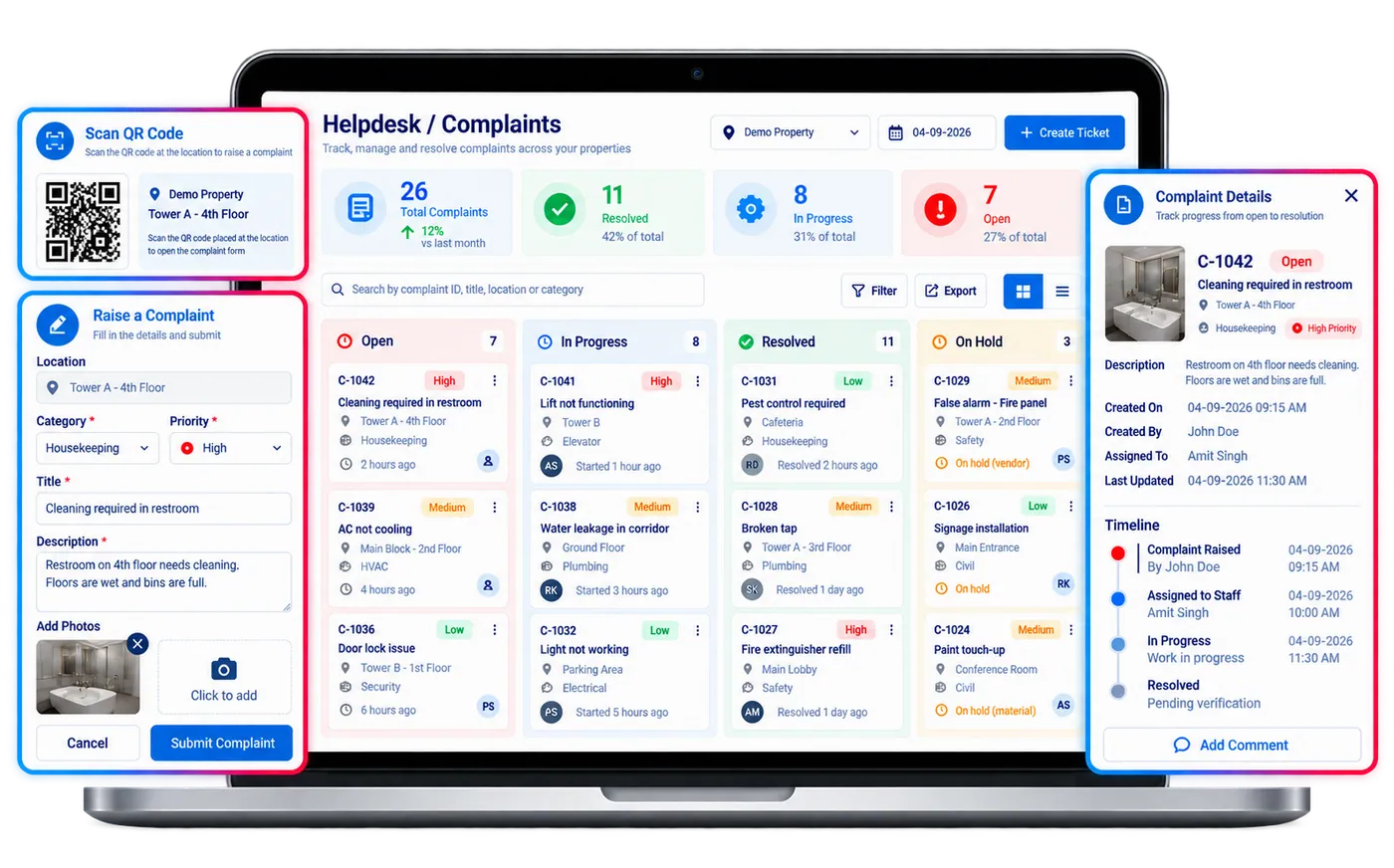
Complaint & Helpdesk Automation replaces WhatsApp complaints and lost front-desk notes with scan-to-raise QR ticketing that auto-routes to the right technician, tracks every SLA, and leaves a full audit trail from report to resolution.
Scan-to-raise
QR ticket creation
Auto-routed
Every ticket, zero manual triage
Zero
Dropped issues
Companies Using Firmity
Join hundreds of facility managers transforming their operations




















What is Complaint & Helpdesk Automation?
Complaint & Helpdesk Automation is Firmity's QR-powered ticketing module for facility issues. Building occupants scan a QR code placed at the location, describe the problem and attach photos, and the ticket is created with that location already attached. Firmity routes each ticket automatically to the concerned technician, tracks its status and priority, and shows live status boards so managers can see what is open, overdue or resolved. Service-level agreement and turnaround-time tracking, an escalation matrix and notifications keep tickets moving, while every action is written to an audit trail from report to resolution. Requesters can rate the fix, reopen a ticket that was not resolved, and review comments and history. The module replaces WhatsApp complaints and lost front-desk notes so that no issue is dropped between reporting and resolution, and it feeds analytics dashboards that show recurring problem areas across a site.
Everything your helpdesk team needs.
Multi-Channel Complaint Intake
Capture complaints via mobile app, web portal, QR codes, email, or front-desk logging — every submission lands in a single queue.
Auto-Categorisation and Routing
Classify complaints by type, zone, and priority automatically, and route to the right team or technician without manual assignment.
SLA Tracking and Escalation
Define resolution SLAs per complaint type — automatic escalation fires when deadlines approach, keeping management informed.
Real-Time Status Notifications
Complainants and supervisors receive instant updates at every status change — no need to chase for progress.
Resolution Analytics Dashboard
Track open counts, average resolution time, SLA compliance rate, and recurring issue patterns across facilities.
Full Audit and History Trail
Every comment, reassignment, and status update is logged with user and timestamp — built for accountability and audits.
Every field a ticket needs, grouped the way your team works.
The fields below are the same feature set listed on the Features page, organized here into the four stages a ticket actually moves through — intake, routing, resolution, and reporting.
Ticket intake & categorization
A complaint starts as a structured, located, categorized ticket — not a message that has to be re-typed into a system later.
- Ticket Management
- Ticket Category
- Ticket Description
- Ticket Image Attachment
- QR-based Ticketing
- Geo-located Ticketing
Routing & SLA control
Priority and category drive automatic assignment and a resolution clock the team can't quietly let slip.
- Auto Ticket Assignment
- Ticket Priority
- SLA Tracking
- TAT Tracking
- Escalation Matrix
Resolution & communication
Status changes and comments reach the right people the moment they happen, and a closed ticket can be reopened if the issue recurs.
- Ticket Status
- Real-time Ticket Updates
- Ticket Comments & Remarks
- Notifications & Alerts
- Ticket Reopening
- User-Friendly Interface
Reporting & feedback
A full history, searchable and exportable, turns complaint data into a pattern-finding tool instead of a closed file.
- Ticket History & Activity Log
- Resident Feedback & Rating
- Analytics Dashboard
- Ticket Search & Filters
- DMR Report
Contact Us for a Walkthrough
Tell us about your requirements and we will get back to you within 24hrs.
What a week with Complaint & Helpdesk Automation actually looks like.
Original walkthrough for this rebuild — no new numbers, just the day-to-day sequence the capabilities above add up to.
A resident scans and reports
A leaking pipe gets reported by scanning a corridor QR code — category, location, and a photo attach automatically, no front-desk call needed.
The ticket routes itself
Based on category and zone, the ticket lands directly on the assigned plumbing technician's queue — no supervisor manually assigning it.
An SLA clock starts ticking
The complaint's SLA timer counts down visibly on the status board; as it nears deadline, the escalation matrix notifies the shift supervisor automatically.
The resident sees progress without asking
A status change to "in progress" pushes a notification to the resident — no one has to call the office to ask what's happening.
A pattern surfaces in the dashboard
The analytics dashboard flags a spike in recurring plumbing complaints in one wing — a maintenance review gets scheduled from the data, not a hunch.
Works well with
FAQ
Quick answers to what teams evaluating Complaint & Helpdesk Automation ask most.
A WhatsApp group has no SLA clock, no automatic routing, and no searchable history. Every ticket here is categorized, routed, and timestamped automatically, so nothing depends on someone scrolling back through messages to find what was reported.
Ready to route every complaint automatically?
Facility and property teams use Firmity's Complaint & Helpdesk Automation to cut resolution time, stay SLA-compliant, and give every ticket a full audit trail.
