Attendance that verifies itself.
Payroll that's already ready.
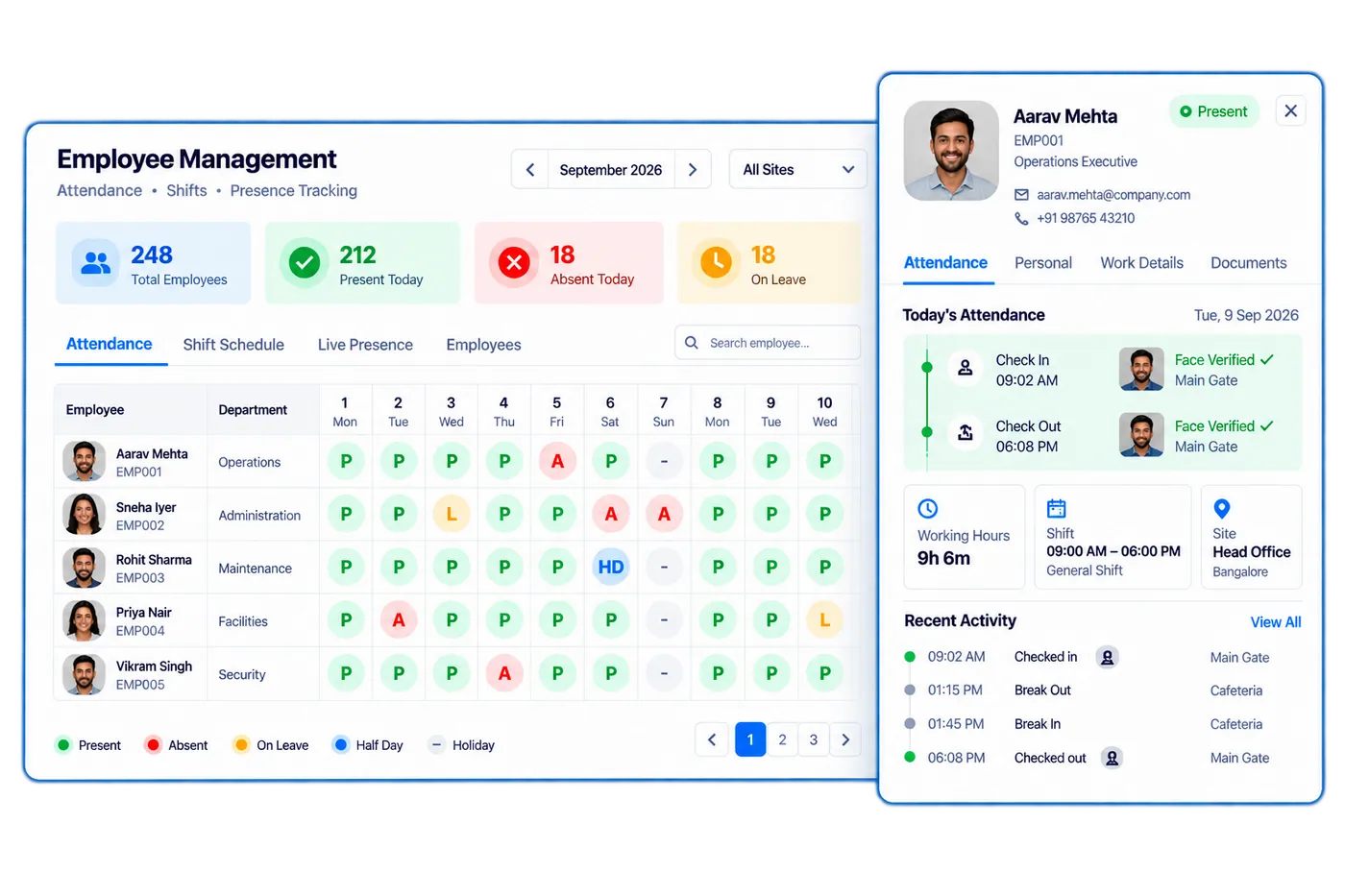
Employee Management Automation replaces buddy-punching and paper muster rolls with touchless, geo-fenced facial-recognition attendance — leave requests, working-hour calculations, and payroll-ready exports, all from one system.
Touchless
Facial-recognition check-in
Geo-fenced
Site presence verification
Payroll-ready
Attendance exports
Companies Using Firmity
Join hundreds of facility managers transforming their operations















What is Employee Management Automation?
Employee Management Automation is Firmity's workforce and attendance module. It records attendance with touchless, geo-fenced facial recognition, so an employee can only punch in from the assigned site and one person cannot mark attendance for another. Managers see real-time site presence across locations, while shift management, a holiday calendar and working-hour and overtime calculations run automatically. Employees request leave digitally under configurable leave policies and types, and approvers respond inside the system. Digital onboarding captures employee details and documents, and an employee self-service app gives staff access to their own records. Attendance and working hours flow into instant payroll-ready exports, which removes manual muster rolls and re-keying of data. Reports and analytics summarise attendance across all sites, so facility and HR managers can see coverage and absences in one place. The module is designed for organisations that run multiple locations and need a single, reliable record of who was present, where and for how long.
Everything your workforce management team needs.
Mobile Check-In and Check-Out
Staff mark attendance via mobile app with GPS verification — supervisors get a live view of who is on-site, on time, and on shift.
Geo-Fenced Attendance
Restrict check-ins to authorised locations — if a staff member checks in outside the facility perimeter, the system flags it immediately.
Shift and Roster Management
Define shifts, assign rosters, and track adherence in real time, including rotating shifts, night duties, and multi-site assignments.
Late and Absence Alerts
Supervisors receive instant alerts when staff are late or absent, so cover can be arranged before operations are affected.
Leave and Holiday Management
Staff apply for leave digitally, supervisors approve or reject with one click, and leave balances update automatically against payroll records.
Attendance Analytics and Reports
Track punctuality trends, absenteeism patterns, overtime, and compliance across teams — export payroll-ready reports for HR and accounts.
Every field a shift needs, grouped the way your team works.
The fields below are the same feature set listed on the Features page, organized here into the four areas workforce management actually moves through — setup, attendance capture, leave and scheduling, and reporting.
Employee setup
An employee is onboarded once with their documents and profile — not re-registered every time a new supervisor needs their details.
- Digital Employee Onboarding
- Documents Management
- Employee Self-Service App
Attendance capture
Facial recognition and geo-verification confirm presence at the actual site, not just a tap on a shared terminal.
- Facial Recognition Attendance
- Attendance Management
- Check-in/out Time Logging
- Working Hours & OT Tracking
Leave & scheduling
Leave policies, approvals, and shift rosters are set up once and enforced automatically, rather than negotiated case by case.
- Leave Policies & Types
- Leave Management
- Leave Approval
- Shift Management
- Holiday Calendar
Reporting
Attendance data exports in a format HR and payroll can use directly, without a manual reformatting step every cycle.
- Export to Excel Sheets
- Reports & Analytics
Contact Us for a Walkthrough
Tell us about your requirements and we will get back to you within 24hrs.
What a week with Employee Management Automation actually looks like.
Original walkthrough for this rebuild — no new numbers, just the day-to-day sequence the capabilities above add up to.
A new guard is onboarded
A new security guard's profile, documents, and shift assignment are set up once. Facial recognition enrollment takes a few seconds on the mobile app.
A geo-fence flags a mismatch
A check-in attempt comes from outside the facility perimeter. The system flags it immediately instead of silently accepting it.
A leave request clears in one click
A housekeeping staff member applies for leave from the self-service app. Their supervisor approves it on mobile, and the leave balance updates automatically.
A late alert reaches the right supervisor
A technician hasn't checked in 20 minutes into their shift. An alert reaches their supervisor immediately, giving time to arrange cover before it affects operations.
Payroll-ready data exports itself
The week's attendance, overtime, and leave data export in a format ready to hand straight to payroll — no manual reconciliation between two systems.
Works well with
FAQ
Quick answers to what teams evaluating Employee Management Automation ask most.
Attendance is marked against a verified face match at the time of check-in, not a shared badge or PIN, so one employee can't check in on another's behalf.
Ready to make attendance a solved problem?
Facility and workforce teams use Firmity's Employee Management Automation to eliminate buddy-punching, cut manual payroll reconciliation, and give supervisors a live view of who's on-site.