Stock that reorders itself.
Ledgers that stay aligned.
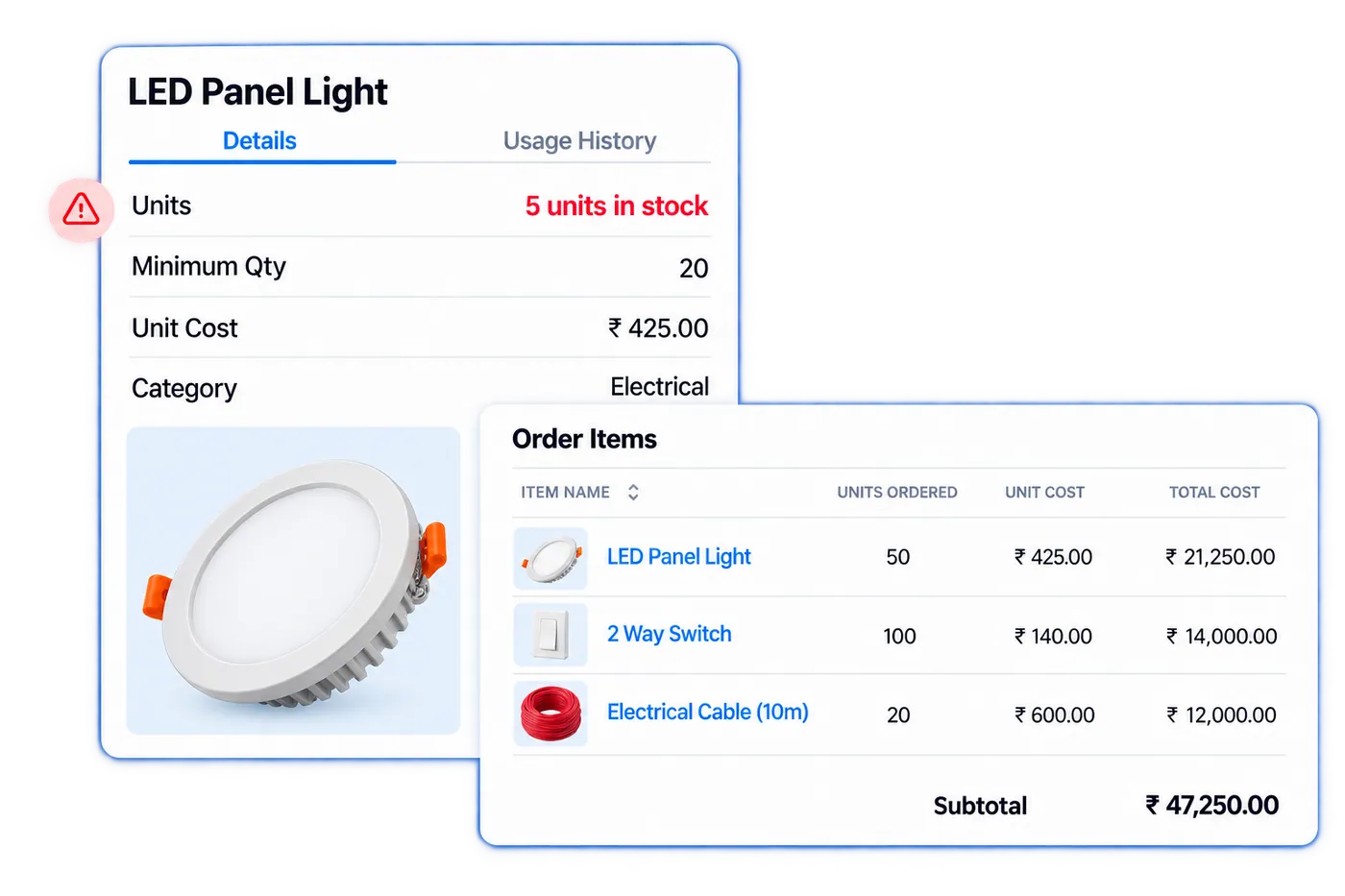
Inventory & Vendor Automation ERP replaces manual stock registers and disconnected purchase approvals with automated PO generation, GRN tracking, and reorder alerts — keeping stock, vendors, and your general ledger aligned without a separate reconciliation step.
Auto-PO
Generated at reorder point
Real-time
Stock-to-ledger alignment
Zero
Manual GRN reconciliation
Companies Using Firmity
Join hundreds of facility managers transforming their operations





















What is Inventory & Vendor Automation ERP?
Inventory & Vendor Automation ERP is Firmity's stock, purchasing and vendor management module, built to connect maintenance work with back-office finance. It maintains item categories and lists, rate cards, vendor records and performance ratings, and stock across multiple warehouse locations. Purchase orders are generated automatically, goods are received against Goods Receipt Notes (GRN), and stock in, stock out and a stock ledger show where every item is. Reorder levels and low-stock alerts warn the team before a critical spare runs out, and requisition and handover steps run through approval workflows. Because the module keeps stock, materials and vendors aligned with the general ledger, finance does not need a separate reconciliation step. Barcode and QR scanning speeds up counting, and stock audit and reconciliation tools support periodic checks. The result is fewer emergency purchases, cleaner vendor records and one financially accurate view of inventory.
Everything your inventory and procurement team needs.
Real-Time Stock Tracking
Monitor every item across all store locations in real time — stock levels update automatically on issue, receipt, or adjustment.
Low Stock and Reorder Alerts
Set minimum stock thresholds per item — automated alerts fire when levels drop below par, eliminating emergency procurement runs.
Purchase Order Management
Raise, approve, and track purchase orders digitally, linked to vendor quotes, GRNs, and invoice history for full procurement visibility.
Auto Replenishment Rules
Configure automatic PO triggers when stock hits reorder point, with preferred vendors, lead times, and order quantities set per SKU.
Multi-Store and Multi-Site
Manage inventory across multiple stores, buildings, or sites from one dashboard, with an audit trail on every inter-location transfer.
Consumption Analytics
Track which items are consumed most, identify wastage patterns, and optimise stock levels using historical demand data.
Every field a stock movement needs, grouped the way your team works.
The fields below are the same feature set listed on the Features page, organized here into the four stages inventory actually moves through — catalogue, procurement, movement, and replenishment.
Item catalogue & setup
Every item is registered once with a category, unit, and location — not re-described each time it's ordered or issued.
- Item Category
- Item Lists
- Item Details
- Barcode/QR Scanning
- Multi-location Warehouse Management
Procurement & vendors
Purchase orders, rate cards, and receipt notes tie back to the vendor record they came from, so procurement history is never a separate spreadsheet.
- Vendor Management
- Rate Card
- PO Management
- GRN (Goods Receipt Note)
- Vendor Performance Rating
Stock movement & control
Every issue, requisition, and handover updates the same ledger, with approval workflows gating anything that needs sign-off first.
- Stock In/Out
- Stock Tracking
- Stock Ledger
- Item Requisition
- Item Handover
- Approval Workflows
Replenishment & audit
Reorder rules and scheduled audits keep stock levels honest without a manual physical count driving every decision.
- Low Stock Alerts
- Reorder Level Management
- Stock Audit & Reconciliation
- Paperless Operations
- Export to Excel Sheets
Contact Us for a Walkthrough
Tell us about your requirements and we will get back to you within 24hrs.
What a week with Inventory & Vendor Automation ERP actually looks like.
Original walkthrough for this rebuild — no new numbers, just the day-to-day sequence the capabilities above add up to.
A technician issues a spare
An HVAC filter is issued against a work order from the store. The stock ledger updates automatically — no separate stock register to update by hand.
A reorder alert fires
Filter stock drops below its set minimum. A purchase order drafts automatically against the preferred vendor and lead time already configured for that item.
A PO gets approved
The draft PO routes through its approval workflow before release — no forwarding an email chain to get sign-off.
A delivery arrives and reconciles itself
A GRN is raised against the incoming delivery. Quantities and rates reconcile against the PO automatically, flagging any mismatch immediately.
A stock audit closes clean
A scheduled stock audit compares physical counts against the ledger. Consumption analytics already explain most of the week's movement, so reconciliation is fast.
Works well with
FAQ
Quick answers to what teams evaluating Inventory & Vendor Automation ERP ask most.
Each item can carry its own reorder point, preferred vendor, and lead time. When stock drops to that threshold, a draft PO is raised automatically against the configured vendor, ready for approval rather than manual creation.
Ready to stop reconciling stock by hand?
Facility and procurement teams use Firmity's Inventory & Vendor Automation ERP to cut emergency procurement, keep vendor records clean, and stay aligned with the general ledger.
