CAFM
CAFM vs CMMS vs IWMS vs EAM: What’s the Difference?
September 29, 2026 · 17 min read
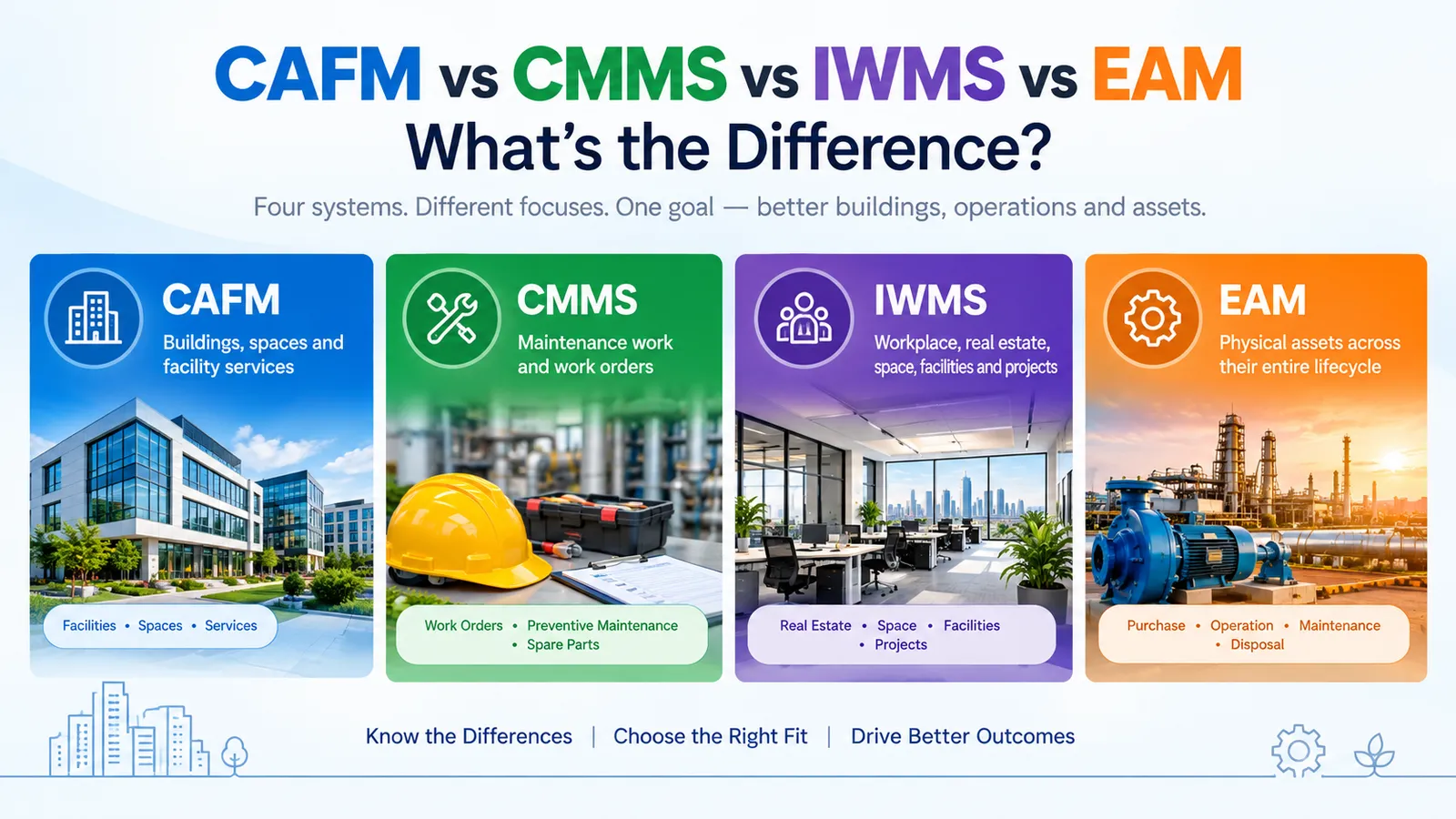
If you’ve ever tried to sort out CAFM vs CMMS vs IWMS vs EAM, you’ve probably ended up with ten browser tabs open and no clear answer. Honestly, that’s normal. These four acronyms sound similar, and they do overlap a lot.
This guide breaks them down in plain language. By the end, you’ll know what each one does, where they differ, and which one fits your situation.
What are CAFM, CMMS, IWMS, and EAM?
All four are software categories that help organisations look after buildings, equipment, and the people who use them. The difference is what each one puts first.
• CAFM (Computer-Aided Facility Management) is built around buildings, spaces, and day-to-day facility services.
• CMMS (Computerized Maintenance Management System) is built around maintenance work.
• IWMS (Integrated Workplace Management System) is built around the whole workplace: real estate, space, facilities, and projects together.
• EAM (Enterprise Asset Management) is built around physical assets across their entire life.
Why are these systems often confused?
Mostly because they share a lot of ground. Almost every one of them handles work orders. Almost every one keeps an asset list.
Vendors add to the confusion. A product might be marketed as a CMMS by one company and as a CAFM by another, even when the features look alike. Categories have also grown over time, so a CMMS today can do things a CMMS didn’t do ten years ago.
So the label matters less than the question underneath it: what is this system actually designed around?
Overview of the key differences
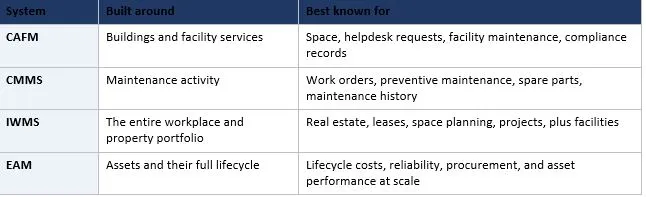
One quick note before we go on. Features vary from vendor to vendor. What follows describes what each category typically does, so always check a specific product against your own needs.
What Is CAFM?
CAFM stands for Computer-Aided Facility Management. CAFM is software that helps facility teams plan, run, and track what happens inside buildings. That includes spaces, equipment, service requests, and maintenance.
To put it simply, if you’re asking what is CAFM software, think of it as a control room for your buildings.
The “computer-aided” part is a nod to its roots. Early tools were built around linking floor plans to facility data.
Facility management itself is a broad field. The International Facility Management Association describes it as an organisational function that brings together people, place, and process in the built environment. CAFM is the software side of that job.
Looking for a CAFM solution?
If your day-to-day challenge is running buildings, tracking space, and keeping facility requests moving, explore CAFM software to see how it brings all of that into one place.
How CAFM works
It usually starts with a record of your buildings, floors, rooms, and assets. Once that’s in place, everything else hangs off it.
• Someone reports a problem, like a broken light or a warm meeting room.
• The request lands in the system and turns into a work order.
• The work order goes to an in-house technician or a contractor.
• The job gets completed, logged, and closed.
• Managers review the data to spot patterns and plan ahead.
Key features of CAFM
• Floor plans and space records
• Helpdesk and service request handling
• Work orders and planned maintenance
• Asset register for building equipment
• Room and desk booking (in some products)
• Move and relocation tracking
• Inspection and compliance records
• Reports and dashboards
Common use cases
• Managing several office buildings from one place
• Running a hospital, university, or corporate campus
• Keeping statutory checks and inspection records in order
• Handling multiple client sites as a facility services provider
Benefits of CAFM
• One clear view of what’s happening across your buildings
• Faster response to service requests
• Audit-ready records instead of scattered spreadsheets
• Less back-and-forth between teams and contractors
What Is CMMS?
A CMMS stands for Computerized Maintenance Management System. CMMS is software that helps maintenance teams plan, schedule, and record maintenance work. Its centre of gravity is the equipment and the technicians who look after it.
It doesn’t try to run your property portfolio. It tries to make sure the right job happens on the right asset at the right time.
How CMMS works
You start by loading your equipment into the system. Each asset gets a record with its details, location, and history.
Next, you set up maintenance schedules. When a job is due, the system creates a work order. The technician completes it, notes the time and parts used, and closes it. Over time, you build a full history of every asset.
Key features of CMMS
• Work order creation and tracking
• Preventive maintenance schedules
• Asset records and maintenance history
• Spare parts and inventory tracking
• Technician scheduling
• Mobile access for field teams
• Reports on downtime, costs, and completion rates
Common use cases
• Maintaining machines on a factory floor
• Looking after HVAC, pumps, boilers, and lifts
• Running an engineering team in a hospital or hotel
• Managing maintenance for schools and public buildings
Benefits of CMMS
• Fewer surprise breakdowns
• More planned work, less firefighting
• Better control of spare parts
• Clear records of who did what and when
• Easier decisions about repair versus replace
Need better control over maintenance?
If unplanned breakdowns and scattered maintenance records are the real problem, it's worth looking at how a dedicated CMMS Software can bring your equipment upkeep under one roof.
What Is IWMS?
An IWMS stands for Integrated Workplace Management System. IWMS is a platform that brings together the different jobs involved in managing property and workplaces. Real estate, space, facilities, maintenance, and projects all sit on one shared database.
The key word is “integrated.” Instead of separate tools for leases, floor plans, and repairs, everything talks to everything else.
How IWMS works
Think of it as a set of modules on a common foundation. You pick the ones you need, such as real estate, space, maintenance, or projects.
Because the data is shared, one decision can draw on several areas. For example, you can look at lease costs, how much a floor is actually used, and maintenance spend before deciding to give up a building.
Key features of IWMS
• Real estate and lease management
• Space planning and occupancy tracking
• Capital project management
• Facility maintenance and work orders
• Move management
• Sustainability and energy tracking
• Room and desk reservations
• Portfolio-level analytics
Common use cases
• Large companies with many offices
• Planning space for hybrid work
• Deciding whether to renew, renegotiate, or exit a lease
• Universities and government bodies with large property portfolios
Benefits of IWMS
• One source of truth across property and facilities
• Better visibility into occupancy and real estate costs
• Stronger control over lease obligations and dates
• Consistent reporting across the whole portfolio
The trade-off is size. IWMS platforms are broad, so they usually take more planning and effort to set up than a focused tool.
What Is EAM?
EAM stands for Enterprise Asset Management. EAM is software for managing physical assets across their whole life, from planning and purchase through operation, maintenance, and eventual disposal. It’s often used across multiple sites and departments.
The thinking behind it lines up with the international asset management standard, ISO 55000, which is about getting value from assets across their life cycle. Maintenance is a big part of EAM, but it isn’t the whole story.
How EAM works
Every asset gets a detailed record. That record follows it for years, covering cost, condition, repairs, and performance.
Maintenance, purchasing, spare parts, and finance all connect to that record. Managers can then ask bigger questions, like which assets cost the most to keep running and which ones should be replaced first.
Key features of EAM
• Detailed asset registry and hierarchy
• Work and maintenance management
• Lifecycle cost tracking
• Procurement and inventory management
• Reliability and condition monitoring
• Links to ERP and finance systems
• Safety and compliance tracking
• Analytics for asset performance and risk
Common use cases
• Utilities and energy companies
• Manufacturing plants with heavy machinery
• Transport networks, ports, and airports
• Mining, oil and gas, and other asset-heavy operations
Benefits of EAM
• A clear picture of total cost of ownership
• Smarter replacement and investment decisions
• Better reliability of critical equipment
• Stronger support for safety and regulatory needs
• Consistent asset practices across sites
CAFM vs CMMS vs IWMS vs EAM: Key Differences
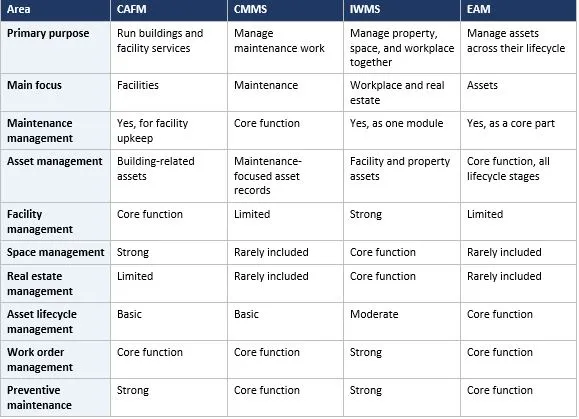
Here’s the side-by-side view. It shows typical tendencies, so treat it as a guide, not a rulebook.
CAFM vs CMMS
Key differences
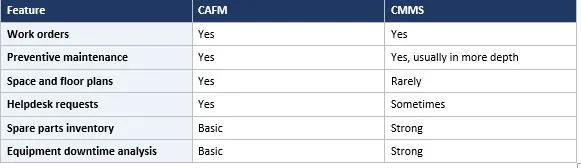
• Scope: CAFM covers the building and its services. CMMS covers maintenance work.
• Space: CAFM usually includes space and floor plan features. CMMS usually doesn’t.
• Users: CAFM serves facility managers and service desks. CMMS serves maintenance managers and technicians.
• Depth: CMMS tends to go deeper on spare parts, downtime, and equipment history.
Similarities
• Both create and track work orders
• Both schedule preventive maintenance
• Both keep an asset register
• Both offer mobile access and reporting
Features comparison
When to use CAFM
Go with CAFM when you manage buildings and need maintenance, space, and service requests in one place. It suits office portfolios, campuses, and facility service providers.
When to use CMMS
Go with CMMS when your main goal is keeping equipment running. It suits plants, engineering teams, and any group with a heavy maintenance load and not much need for space planning.
CMMS vs EAM
Key differences
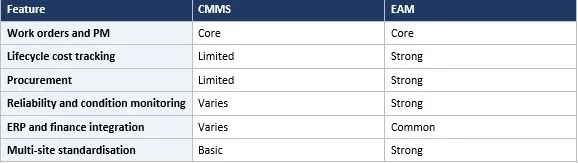
• Scope: CMMS is about maintenance. EAM is about the whole asset lifecycle.
• Scale: CMMS often serves one site or team. EAM often serves many sites and departments.
• Finance: EAM usually connects tightly to procurement and finance. CMMS often connects lightly, if at all.
• Complexity: EAM typically takes more time and effort to set up.
Similarities
• Both manage work orders and preventive maintenance
• Both track assets and their history
• Both help cut unplanned downtime
Maintenance management
Both systems handle maintenance well. A CMMS is often the more straightforward tool for the job. An EAM includes maintenance too, but as one part of a bigger asset strategy.
Asset lifecycle management
This is where they split most clearly. A CMMS mainly cares about what happens while an asset is in service. An EAM follows the asset from planning and purchase through to disposal, and tracks its cost the whole way.
Features comparison
When to use CMMS
Pick CMMS when you need better maintenance control without a big organization-wide programme.
When to use EAM
Pick EAM when assets are expensive, critical, or spread across many locations. It suits organizations that need lifecycle costing, procurement links, and consistent asset practices.
CAFM vs IWMS
Key differences
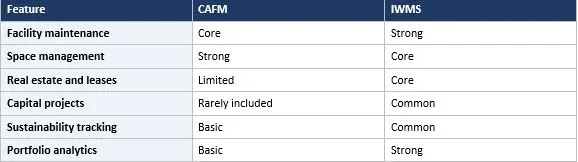
• Breadth: CAFM focuses on facility operations. IWMS covers facilities plus real estate and projects.
• Real estate: IWMS usually includes lease and portfolio tools. CAFM usually doesn’t go that far.
• Decision level: CAFM supports day-to-day operations. IWMS supports operational and strategic property decisions.
• Effort: IWMS is broader, so it often needs more setup.
Similarities
• Both manage space and facility maintenance
• Both use work orders and asset records
• Both provide dashboards and reports
Facility management
Both cover it. In CAFM, facility management is the whole point. In IWMS, it’s one module alongside others.
Space management
Both handle it. CAFM tends to cover floor plans, room data, and moves. IWMS often adds occupancy analysis and planning for how much space you really need.
Real estate management
This is the big gap. IWMS typically includes lease administration, portfolio views, and property-level financials. CAFM usually leaves this to other tools.
Features comparison
When to use CAFM
Use CAFM when the job is running buildings well. If your team wants maintenance, space, and helpdesk in one place, CAFM is usually enough.
When to use IWMS
Use IWMS when you also need to manage leases, projects, and the wider property portfolio. It suits organisations that make big decisions about where and how people work.
IWMS vs EAM
Key differences
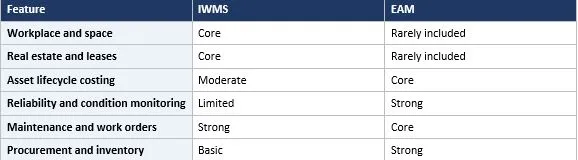
• Focus: IWMS centres on property and workplace. EAM centres on physical assets.
• Typical assets: IWMS deals with buildings, floors, and spaces. EAM deals with machines, plants, networks, and fleets.
• Typical users: IWMS suits corporate real estate and facility leaders. EAM suits operations and asset managers.
Similarities
• Both are broad, enterprise-scale platforms
• Both include maintenance and work orders
• Both support compliance and reporting
• Both often integrate with ERP systems
Workplace management
IWMS is the stronger option here. It usually covers space planning, occupancy, reservations, and moves. EAM generally doesn’t address the workplace experience.
Real estate management
Again, IWMS leads. Lease management and property portfolio tools are typical IWMS territory. EAM usually stays out of it.
Asset lifecycle management
EAM leads this one. It’s designed to track cost, condition, and performance from purchase to disposal. IWMS can track facility assets, but with less lifecycle depth.
Features comparison
When to use IWMS
Choose IWMS if your biggest questions involve property, space, and how people use buildings.
When to use EAM
Choose EAM if your biggest questions involve equipment, reliability, and the cost of keeping assets working over the years.
CAFM vs CMMS vs IWMS vs EAM: Feature Comparison
Here’s the full picture in one table. Core means it’s central to the system. Strong means usually well covered. Basic means usually present but lighter. Limited or rare means you shouldn’t expect it. Varies means it depends a lot on the vendor.
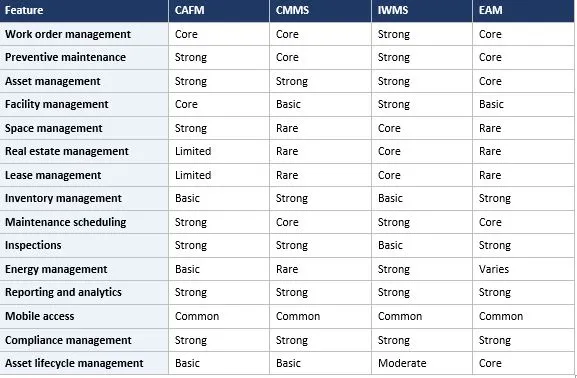
A quick reading tip. Reporting, mobile access, and compliance show up everywhere, but the focus differs. A CMMS reports on maintenance. An IWMS reports on the portfolio. An EAM reports on asset performance and cost.
Which System Is Right for Different Needs?
When to consider CAFM
Consider CAFM if you look after buildings and want maintenance, space, and service requests in one system. It’s a natural fit for facility teams and service providers.
When to consider CMMS
Consider CMMS if maintenance is your main pain point. If you mostly need scheduled jobs, work orders, and spare parts under control, this is the simplest route.
When to consider IWMS
Consider IWMS if you manage a property portfolio and need leases, space, projects, and facilities connected. It works best when property decisions carry serious financial weight.
When to consider EAM
Consider EAM if you run expensive, critical assets across many locations. It helps most when lifecycle cost, reliability, and procurement matter as much as repairs.
Factors to consider before choosing
• What problem hurts the most right now
• How many sites and users you have
• Whether you manage buildings, equipment, or both
• How much setup effort your team can realistically take on
• What other systems you already use
CAFM vs CMMS vs IWMS vs EAM by Industry
There’s no strict rule here. These are common patterns, not fixed answers.
Manufacturing
CMMS or EAM is usually the better fit. Machine uptime, spare parts, and maintenance schedules come first. Larger groups with many plants lean toward EAM.
Healthcare
Hospitals often use CMMS or CAFM to look after building systems and equipment, and to keep inspection records tidy. Large health systems with many properties may look at IWMS.
Education
Campuses have buildings, classrooms, and lots of spaces to schedule. CAFM is common, and larger universities with big portfolios sometimes choose IWMS.
Commercial real estate
IWMS is a strong candidate when leases, tenants, and portfolio-level decisions matter. CAFM works well when the focus is on day-to-day building operations.
Hospitality
Hotels care about room readiness, guest requests, and equipment like HVAC and lifts. CAFM and CMMS are both popular choices here.
Retail
Retailers with many stores usually want quick repair requests and consistent upkeep across locations. CAFM or CMMS fits well, and IWMS becomes attractive when store leases are a big topic.
Government
Public bodies often manage large property estates and infrastructure. IWMS suits property portfolios. EAM suits infrastructure and public assets. CAFM suits building operations.
Data centers
Uptime is everything, so CMMS or EAM is the usual pick. They help you schedule maintenance on critical power and cooling equipment and keep clear records.
Facility management companies
Service providers need to manage many client sites, contractors, and service levels. CAFM is a common choice, and some also use CMMS-style tools for maintenance-heavy contracts.
Can CAFM, CMMS, IWMS, and EAM Work Together?
Yes, they can. Plenty of organisations run more than one. The trick is making sure they don’t fight each other.
Software integrations
Most modern systems can connect to other software. For example, a CAFM might pass asset data to an EAM, or an IWMS might pull maintenance costs from a CMMS.
ERP integration
ERP systems handle finance, purchasing, and often HR. Linking your maintenance or asset system to the ERP means purchase orders, invoices, and costs don’t need to be typed in twice. EAM systems are especially known for this.
API integrations
An API lets two systems talk to each other automatically. If you’re buying anything, ask what APIs are available and how well they’re documented. It’ll save you headaches later.
Data sharing
Agree on which data moves where. Asset details, locations, work order status, and costs are the usual candidates. Start small and expand once it’s working.
Avoiding duplicate data
Designate one system as the "source of truth" for each type of data you track. If the EAM holds the master asset list, for instance, every other connected system should pull from it rather than keeping a separate copy. That one rule alone prevents most of the data conflicts organisations run into.
Using multiple systems together
A common pattern is a specialist tool on the ground and a bigger platform above it. For instance, a CMMS for the maintenance team, feeding costs up to an IWMS or ERP. It works, but it needs clear ownership and regular checks.
How to Choose Between CAFM, CMMS, IWMS, and EAM
Define business requirements
Write down the problems you want to solve. “Cut breakdowns” points to CMMS or EAM. “Track leases” points to IWMS. “Handle service requests” points to CAFM.
Identify users
List who’ll actually log in. Technicians, facility managers, finance, and executives all need different things. If the daily users find it hard, the system won’t get used.
Assess maintenance requirements
Check how much preventive maintenance you run, how complex your equipment is, and how much you rely on spare parts. Heavy needs point toward CMMS or EAM.
Assess facility and space requirements
If you need floor plans, room data, moves, or desk booking, look at CAFM or IWMS. If space isn’t a concern, you can skip those features.
Evaluate asset management needs
Ask whether you need lifecycle costing, condition monitoring, or replacement planning. If yes, EAM deserves a serious look.
Check integrations
List the systems you already use, such as ERP, building management, or finance tools. Confirm the new system can connect to them.
Consider scalability
Think about growth. More sites, more users, or new asset types can outgrow a simple tool quickly. Equally, don’t buy a huge platform for a small team.
Evaluate reporting requirements
Decide which reports leaders actually need. Maintenance cost, response times, space use, and lease dates are all different reports and often need different systems.
Compare implementation requirements
Setup timelines vary a lot between these systems, so it's worth asking upfront. Find out how data gets migrated in, who handles the configuration, and how much training your team will actually need before they're comfortable using it. As a rule, the more modules a platform covers, the longer you should expect the rollout to take.
Compare total cost of ownership
The licence fee is just the starting point, not the full picture. Factor in what it costs to migrate your existing data, train staff, connect it to other tools you already run, and keep getting support and updates in the years ahead. A cheaper-looking system can end up costing more once all of that is added in.
Which system is used for maintenance management?
CMMS is the most direct choice. EAM also covers maintenance, usually as part of broader asset management.
Conclusion
Let’s pull it together. CAFM is about running buildings. CMMS is about maintenance. IWMS is about property and the workplace. EAM is about assets across their whole life.
They overlap, and that’s why they get mixed up. But once you ask what each one is built around, the differences get much clearer.
Your own needs should make the call. Start with the problem you’re trying to fix, count your users and sites, and think about where you’ll be in a few years. The right system is the one that fits your situation, not the one with the longest feature list.
Want to see how this works with your own building data? Get a free facility health assessment or book a quick demo with our team.
If you’d like to keep reading, you can find more on CAFM software, facility management, and related topics at Firmity.
FAQs : CAFM vs CMMS vs IWMS vs EAM
Think of CAFM as the wider net — it looks after buildings, the spaces inside them, and the day-to-day facility services that keep a site running. CMMS is narrower and more mechanical, zeroing in on maintenance tasks and the equipment behind them. So CAFM tends to bring space planning into the mix, while CMMS puts more weight on things like spare parts tracking and detailed equipment history.
Not quite. CAFM stays focused on keeping facility operations running smoothly. IWMS takes a bigger-picture approach, folding in real estate, lease obligations, and project management alongside facilities, all on one connected platform.
They're related but not interchangeable. Both use work orders and both schedule preventive maintenance, so there's real overlap. The difference comes down to breadth — CAFM takes in the whole facility, while CMMS stays trained on maintenance specifically.
CMMS is built around maintenance — getting jobs scheduled and done. EAM zooms out further, tracking an asset from the moment it's bought all the way through to disposal, purchasing and lifecycle costs included. EAM also tends to scale across multiple sites and departments rather than staying confined to one team.

Syed Aadam
Syed Aadam is a software engineer with a Bachelor's and Master's in Information Technology with a specialization in Artificial Intelligence and Machine Learning. Having trained, and assisted in training foundational ML models for solving frontier scientific problems at the intersection of biodiversity and technology, Syed Aadam has been working to develop AI-enabled CMMS, ERP and CAFM softwares at Ufirm Technologies.
Talk to our team
Questions about facility management software? Leave your details and we'll get back to you within 24 hours.
More on CAFM
How to Choose the Right CAFM Software
Picking the right CAFM software isn't just a software decision — it's a decision that shapes how your facility team works for the next several years.…
What is CAFM Software? A Guide for Facility Managers Who Are Tired of Spreadsheets
What is a CAFM system? Learn how CAFM software works, its key features, benefits, and how it compares to CMMS, IWMS, and EAM systems.
