Guide
CAFM vs CMMS: What’s the Difference?
September 30, 2026 · 12 min read
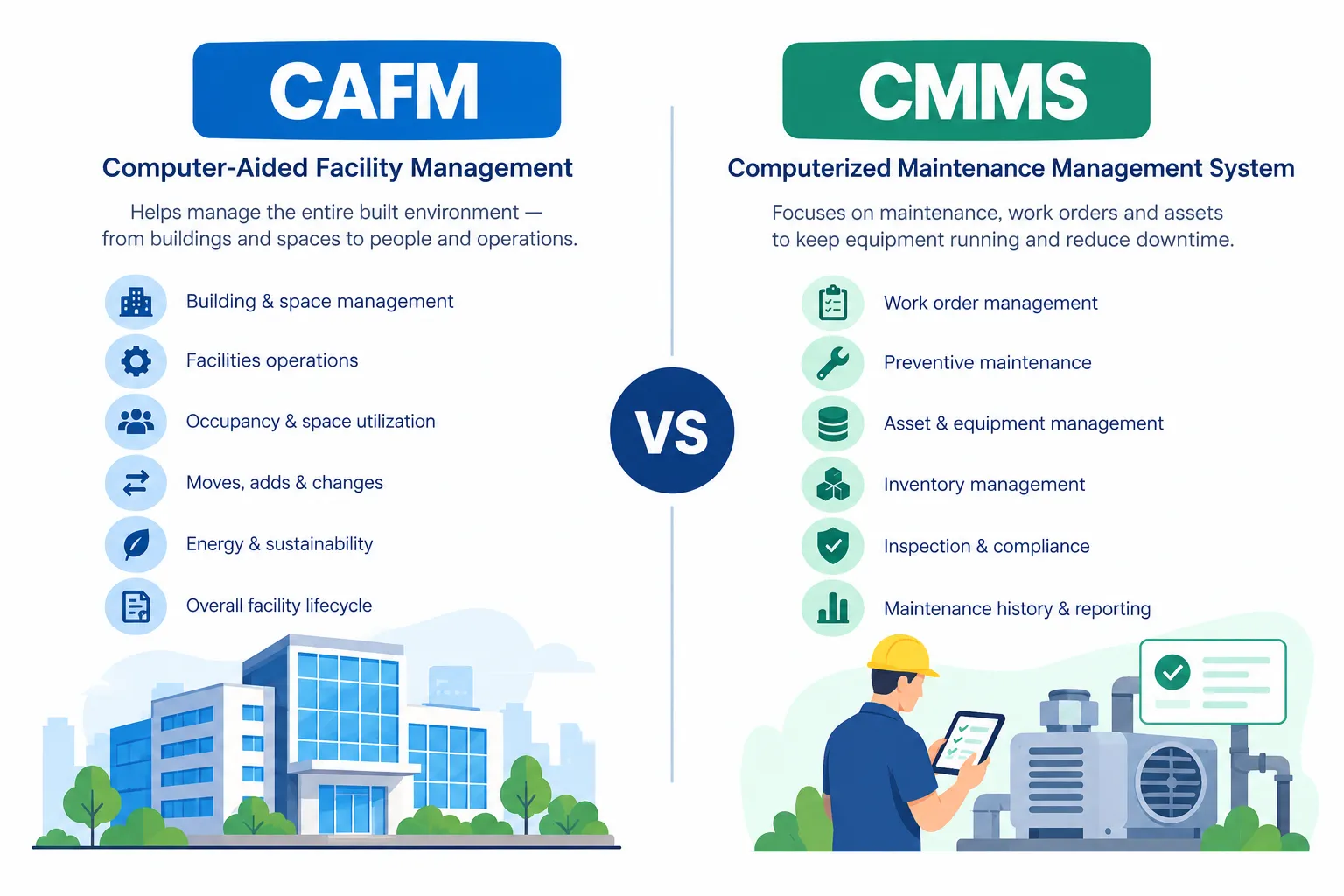
CAFM vs CMMS is a common comparison for organizations trying to choose the right software for facility and maintenance work. The two systems overlap in areas such as assets, work orders, maintenance schedules, and reporting, but they are generally built around different priorities.
CAFM, or Computer-Aided Facility Management, is usually broader from a facility-operations perspective. It can bring together information about buildings, spaces, assets, moves, work requests, and other facility activities. CMMS, or Computerized Maintenance Management System, is more focused on organizing and improving maintenance operations.
The distinction is not always absolute. Modern platforms can combine capabilities, and vendors may use the terms differently. That is why it is more useful to compare what each system is designed to manage rather than relying only on the software label.
What Is CAFM?
let's undertand what is CAFM Software CAFM stands for Computer-Aided Facility Management. You may also see the term written as Computer-Assisted Facility Management.
CAFM software used to organize information and processes related to facilities. Depending on the platform, it may cover areas such as space information, building operations, assets, maintenance requests, moves, projects, and facility-related records.
The International Facility Management Association (IFMA) describes CAFM as a software system that can provide access to information such as space utilization and lease information, while also supporting functions such as work orders, preventive maintenance, move management, and asset management.
How CAFM works
A CAFM system typically brings facility information into one place. A facility team might use it to view building or room information, manage space records, create work requests, coordinate maintenance activities, and keep facility data connected.
The exact workflow depends on the system. A CAFM platform may be used by facility managers, workplace teams, operations staff, maintenance teams, property teams, and other people involved in managing the built environment.
Key features of CAFM
· Space and floor-plan information
· Facility and building records
· Asset information
· Work request and work order management
· Preventive maintenance
· Move and workplace management
· Project and facility activity tracking
· Reporting and facility analytics
Common CAFM use cases
CAFM is commonly relevant when an organization needs to manage more than maintenance alone. For example, a large office may need to track rooms, occupants, floor areas, facility requests, assets, maintenance activities, and workplace changes in a connected system.
Benefits of CAFM
The main benefit is having facility information organized in a way that supports day-to-day operations. Instead of keeping space records, maintenance requests, and facility information across separate spreadsheets or documents, teams can work from a more centralized source.
What Is CMMS?
CMMS stands for Computerized Maintenance Management System.
A CMMS is software designed to manage maintenance information and maintenance workflows. It helps teams organize work orders, preventive maintenance schedules, asset records, inspections, spare parts, maintenance history, and performance data.
For a deeper introduction, see our guide on what is CMMS and explore how CMMS software can support maintenance workflows.
How CMMS works
A typical CMMS workflow starts when a maintenance request or planned task is created. The task can then be assigned to a technician, scheduled, completed, and recorded. The system keeps the resulting information so teams can review maintenance history and track ongoing work.
For example, a preventive maintenance plan for an air-conditioning unit can automatically create a scheduled task. A technician completes the inspection, records the work performed, and updates the work order. That history can later be used when reviewing the asset.
Key features of CMMS
· Work order management
· Preventive maintenance scheduling
· Asset and equipment records
· Maintenance history
· Inspections and checklists
· Spare parts and inventory tracking
· Technician and task assignment
· Maintenance reporting and KPIs
· Mobile access for maintenance teams
Common CMMS use cases
CMMS is especially useful when maintenance is the main operational requirement. Manufacturing plants, hospitals, hotels, campuses, commercial buildings, and other asset-intensive environments can use CMMS to organize corrective and preventive maintenance.
CAFM vs CMMS: Key Differences
The simplest way to understand CAFM vs CMMS is to look at the main problem each system is intended to solve. CAFM generally has a broader facility-management scope, while CMMS is centered on maintenance management.
CAFM vs CMMS: Feature Comparison
There is significant overlap between CAFM and CMMS. A feature appearing in both systems does not mean the systems are identical. The difference often comes down to how that feature is used and what the wider platform is designed to manage.
Work order management
Both can support work orders. In CMMS, work orders are usually at the center of the maintenance workflow. In CAFM, they may be one part of a wider facility workflow.
Preventive maintenance
Both can support scheduled maintenance. CMMS typically puts stronger emphasis on maintenance schedules, task history, and technician execution.
Asset tracking
Both may store asset details. CMMS generally focuses on maintainable equipment, while CAFM can connect assets with broader facility information.
Facility management
CAFM is generally more closely associated with broader facility operations. CMMS can support the maintenance side of facility management.
Space management
Space and floor information is commonly associated with CAFM. It is not normally the central purpose of a CMMS.
Maintenance scheduling
Both can support scheduled activities, but CMMS is specifically built around maintenance scheduling and execution.
Inventory management
CMMS commonly tracks maintenance parts and spare items. CAFM may include inventory features depending on the platform.
Inspections
Both may support inspections, checklists, or facility rounds, depending on the software.
Vendor management
Either platform may include vendor information, but the depth of vendor management varies by product.
Compliance management
Both may help keep records and schedules, but compliance capabilities depend heavily on the specific system and industry.
Reporting
CAFM reporting can cover facility and space information, while CMMS reporting often centers on maintenance performance, work orders, assets, and inventory.
Mobile access
Modern CAFM and CMMS platforms may provide mobile access. The useful features depend on the workflows the mobile app supports.
CAFM vs CMMS: Similarities
The two systems are not completely separate categories. Their capabilities can overlap, especially in modern facility-management platforms.
· Both can centralize operational information.
· Both can support asset records.
· Both can manage work requests or work orders.
· Both can support preventive maintenance.
· Both can help teams schedule tasks.
· Both can provide reports and performance information.
· Both may offer mobile access.
This overlap is one reason the terms can be confusing. Two products may both offer maintenance and asset features while having different strengths in space, workplace, or facility management.
CAFM vs CMMS: Differences in Use Cases
CAFM use cases
· Facility operations across buildings or sites
· Space and room management
· Building information management
· Workplace and move management
· Facility-related requests and activities
· Connecting facility information with maintenance and other operations
CMMS use cases
· Preventive maintenance
· Corrective maintenance
· Equipment maintenance
· Work order management
· Asset maintenance history
· Spare parts and maintenance inventory
· Maintenance inspections and checklists
CAFM vs CMMS for Facility Management
Facility management covers a wide range of activities involving people, places, and processes. That means software used for facility management does not necessarily need to be limited to maintenance.
CAFM can be useful when the team needs a wider view of facilities, including spaces, buildings, assets, requests, and related operations. CMMS can be useful when the main requirement is controlling and improving maintenance work.
In some organizations, the two approaches can also exist together. A facility team may use a broader facility platform while maintenance teams use a CMMS for detailed maintenance execution. Whether that setup is practical depends on the organization's processes and integration needs.
CAFM vs CMMS for Asset Management
Asset tracking
Both CAFM and CMMS can maintain records about assets, but the information may be organized differently. CAFM may connect an asset with a building, floor, room, or facility record. CMMS generally connects an asset with its maintenance schedule, work orders, failures, inspections, and service history.
Asset maintenance
CMMS is particularly useful when an asset needs regular maintenance. Teams can keep preventive schedules, record completed tasks, and review previous work.
Asset history
A useful maintenance history can show what was repaired, when it happened, who performed the work, and what parts or actions were involved. This information helps teams understand recurring issues and plan future maintenance.
Lifecycle information
Asset lifecycle information can extend beyond maintenance. Depending on the platform, CAFM may connect asset information with facility or space records, while broader asset-management systems may cover acquisition, operation, maintenance, and retirement.
Equipment performance
CMMS can provide maintenance-related performance information such as work volume, downtime records, maintenance costs, and other KPIs. The exact metrics depend on the data captured by the organization.
CAFM vs CMMS: Which One Do You Need?
There is no universal answer because the right system depends on what the organization actually needs to manage.
When to consider CAFM
CAFM may be relevant when the main requirement includes broader facility operations, space management, building information, workplace changes, and facility-related workflows alongside maintenance.
When to consider CMMS
CMMS may be relevant when maintenance is the main priority. If the team needs strong work order management, preventive maintenance, equipment history, inspections, spare parts tracking, and maintenance reporting, CMMS capabilities are directly aligned with those needs.
Business size and complexity
Company size alone does not determine whether CAFM or CMMS is appropriate. A smaller organization can have complex maintenance needs, while a large organization may need detailed space and facility management. The better starting point is the number and type of processes the software must support.
Facility management requirements
If space, buildings, workplace information, and facility operations are central requirements, look closely at CAFM capabilities.
Maintenance requirements
If the main challenge is managing maintenance requests, planned maintenance, technicians, inspections, and maintenance history, look closely at CMMS capabilities.
Asset management requirements
Consider how detailed the asset records need to be and whether the organization needs maintenance history, spare parts, inspections, and asset-related reporting.
Space management requirements
If the organization needs floor plans, room assignments, occupancy information, or space utilization records, space-management capabilities become an important part of the evaluation.
Integration requirements
Before selecting a system, check whether it can connect with the tools the organization already uses. Integration may be important for asset data, finance, procurement, HR, building systems, identity management, or other operational platforms.
Can CAFM and CMMS Work Together?
Yes, CAFM and CMMS can work together when the systems and workflows are designed to exchange relevant information.
CAFM and CMMS integration
An integration can connect facility information with detailed maintenance processes. For example, a facility record may identify where an asset is located, while the CMMS stores its maintenance schedule and service history.
Sharing asset and maintenance data
Keeping key information synchronized can reduce duplicate data entry. The exact data exchanged depends on the integration, but it may include asset identifiers, locations, work orders, status information, and maintenance records.
Work order synchronization
When a work request is created in one system, an integration may pass it to another system for assignment and execution. The status can then be returned so the wider facility record stays up to date.
Benefits of integration
The main benefit is continuity of information. Facility teams can work with facility-level information while maintenance teams can work with detailed maintenance workflows without repeatedly entering the same information.
When using both systems makes sense
Using both can make sense when facility management and maintenance have different operational requirements and a reliable integration is available. It may be less practical when one platform already covers the required workflows without unnecessary duplication.
CAFM vs CMMS by Industry
Manufacturing
Manufacturing organizations often have detailed equipment maintenance requirements, making CMMS particularly relevant. CAFM can also be useful when the organization needs broader building and facility information.
Healthcare
Healthcare facilities have both building and equipment responsibilities. Maintenance tracking can be important for equipment and infrastructure, while broader facility workflows may require CAFM capabilities.
Hospitality
Hotels and hospitality businesses manage guest-facing spaces, rooms, building systems, and maintenance tasks. The balance between CAFM and CMMS depends on whether space and facility operations or maintenance execution is the main need.
Education
Schools, colleges, and universities may manage multiple buildings, rooms, assets, and maintenance activities. CAFM can support broader campus information, while CMMS can organize maintenance work.
Commercial buildings
Commercial property teams may need building, space, tenant, asset, and maintenance information. The appropriate system depends on which of these workflows need the most detailed management.
Retail
Retail organizations operating many locations may need centralized facility and maintenance processes. CMMS can support maintenance workflows, while CAFM may be useful when broader site and space information is required.
Real estate
Real estate operations can involve property, space, building, and maintenance information. CAFM can support broader facility records, while CMMS is more maintenance-centered.
Facility management companies
Facility management companies may manage different clients, sites, assets, technicians, requests, and maintenance schedules. The required software scope depends on the services being delivered and the level of facility information that must be managed.
CAFM vs CMMS: Cost Considerations
CAFM and CMMS pricing varies widely, so a simple statement that one category always costs more would be misleading. The total cost depends on the product, users, modules, implementation requirements, integrations, and the amount of data involved.
· Software pricing model and selected modules
· Number of users and user roles
· Number of sites, buildings, spaces, or assets
· Implementation and data migration
· Integrations with existing systems
· Configuration and customization
· Training and onboarding
· Maintenance, support, and ongoing service costs
A system that requires extensive customization or manual work may have a different total cost than a system that fits the existing workflow more closely.
15. Conclusion
When comparing CAFM vs CMMS, the main point is to look at what your team actually needs to manage. The two systems share several features, but their primary areas of focus can be different.
CAFM is commonly used for wider facility-related activities, including buildings, spaces, workplace information, and facility operations. CMMS puts more attention on maintenance activities such as work orders, preventive maintenance, inspections, equipment records, and maintenance history.
Because many modern platforms offer overlapping features, the software name alone does not tell the whole story. Looking at the workflows, features, integrations, and day-to-day requirements will give you a clearer idea of which type of system fits your organization.
Want to see how this works with your own building data? Get a free facility health assessment or book a quick demo with our team.
FAQs : CAFM vs CMMS
CAFM is usually designed to handle a wider range of facility-related activities, such as buildings, spaces, workplace information, and facility operations. CMMS has a stronger maintenance focus, helping teams manage work orders, scheduled maintenance, equipment records, inspections, and service history.
It depends on what the organization needs to manage. CAFM can be relevant when facility operations and space information are important, while CMMS is more suitable for teams whose main requirement is organizing maintenance activities and equipment-related work.
CAFM and CMMS are closely related, and their boundaries can vary between software products. In general, CAFM is used as a broader facility-management category, while CMMS is commonly associated with maintenance management. Some platforms combine capabilities from both.
Yes. CMMS can handle an important part of facility management by organizing maintenance requests, work orders, preventive maintenance, inspections, equipment records, and maintenance history. However, it may not include broader functions such as space or workplace management.
Yes. Maintenance is often included within CAFM platforms. Depending on the software, facility teams may be able to create work requests, schedule maintenance, manage assets, assign tasks, and keep records of completed work. The available features differ from one CAFM product to another.
CAFM is generally associated with broader facility management, CMMS with maintenance management, and EAM with managing physical assets across a broader lifecycle. These categories can overlap, and some software platforms combine capabilities from more than one category.
Yes, integration is possible when both systems provide compatible integration options. For example, information about an asset, its location, a maintenance request, or work-order status can potentially move between the two systems. The exact setup depends on the software and the organization's workflow.

Syed Aadam
Syed Aadam is a software engineer with a Bachelor's and Master's in Information Technology with a specialization in Artificial Intelligence and Machine Learning. Having trained, and assisted in training foundational ML models for solving frontier scientific problems at the intersection of biodiversity and technology, Syed Aadam has been working to develop AI-enabled CMMS, ERP and CAFM softwares at Ufirm Technologies.
Talk to our team
Questions about facility management software? Leave your details and we'll get back to you within 24 hours.
More on Guide

Monsoon Readiness Checklist for Facility Managers in India
The rains expose every gap in a facility's maintenance plan. Here's how to close them before the first downpour.

A New Chapter: Firmity Expands to Hyderabad
Closer Partnerships, Better Service
Predictive Maintenance for Renewable Energy Assets
A Smarter Approach to Maximizing Performance
