Payroll Management
9 Common Mistakes When Choosing Payroll Software (and How to Avoid Them)
· 8 min read
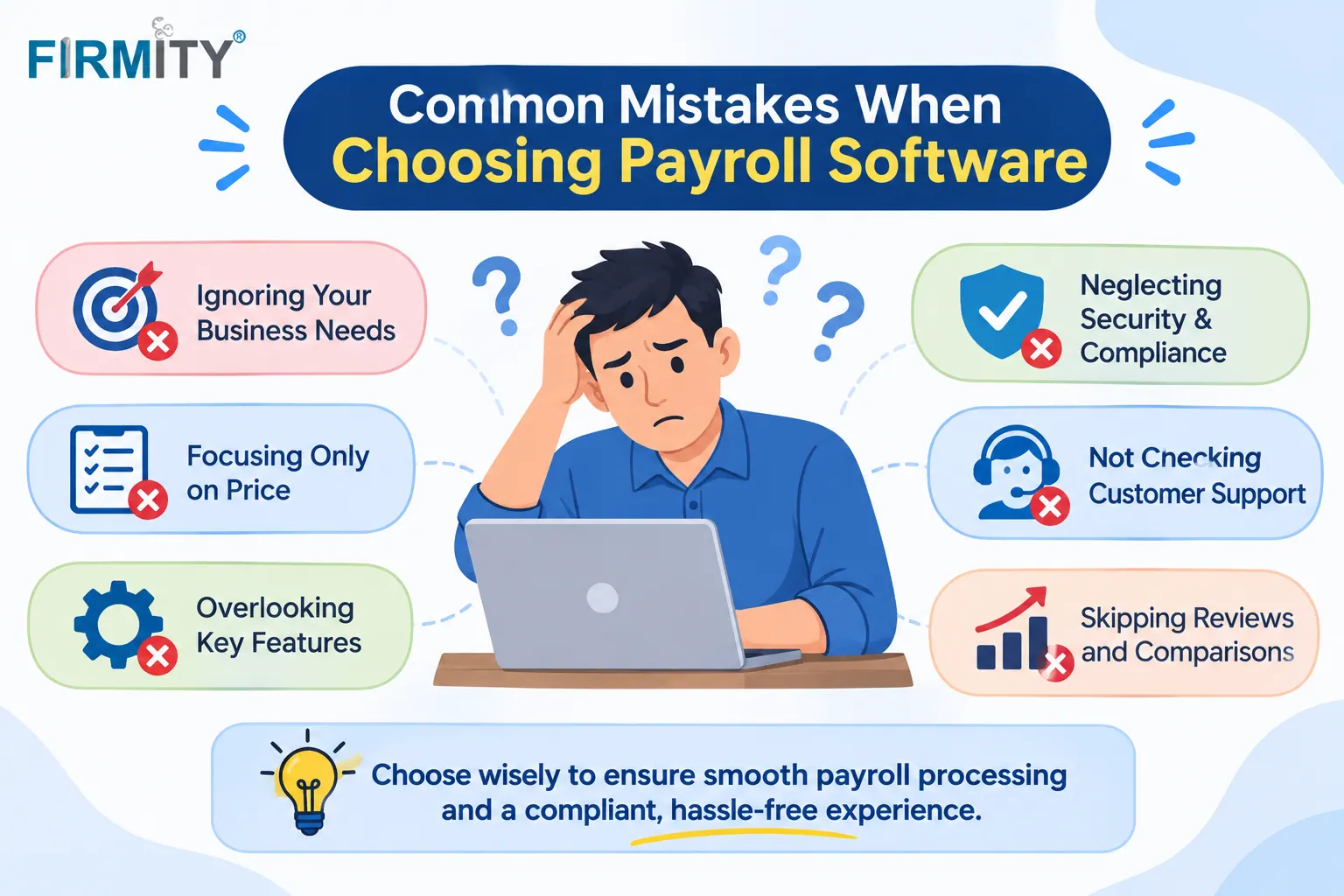
The most common mistakes when choosing payroll software are buying on price alone, ignoring local compliance and skipping a test on your own pay cycle. Nine are covered below.
Payroll mistakes are rarely dramatic at first. They show up months later as wrong deductions, late payments or a team that quietly goes back to spreadsheets. In this guide, we’ll walk through nine mistakes, what each one can cost you and a simple way to avoid it. If you’re still getting started, our overview of what is payroll software explains the basics.
The 9 mistakes at a glance
Short on time? Here’s the quick version, with the one-line fix for each mistake. The sections after the table explain why each one happens.
Mistake | What it can cost you | The fix in one line |
|---|---|---|
1. Choosing on price alone | Extra fees and a costly switch later | Compare total cost, not the sticker price |
2. Ignoring compliance | Wrong deductions and legal risk | Ask how rules and updates are handled for your country |
3. Buying only for today | Software that stops fitting as you grow | Plan for more people, sites and pay types |
4. Skipping a real demo | Unpleasant discoveries once you’ve signed up | Run one real pay cycle in the demo |
5. Ignoring integrations | Retyping data and more errors | Check how attendance, HR and accounting connect |
6. Overlooking ease of use | Low adoption and extra questions | Let your payroll team and an employee try it |
7. Not checking support | Stuck on pay day | Ask about hours, channels and response times |
8. Forgetting security | Exposed salary data | Check permissions, audit trail and data protection |
9. No rollout plan | A messy switch | Plan a parallel run and training |
The 9 mistakes, one by one
1. Choosing on price alone
A low monthly price is tempting, especially for a small team. The trouble is that the sticker price rarely tells the whole story. Fees for setup, extra employees, add-on modules or support can turn a bargain into an average deal, and switching later costs time, data migration and retraining. Cheap isn’t wrong, as long as it’s the result of comparing like with like.
How to avoid it: ask for the full price for your headcount, including add-ons, and compare totals over a year or two.
2. Ignoring compliance for your country
Payroll rules differ from country to country, and often from region to region. They cover tax withholding, social contributions, leave and record keeping, so a tool that’s brilliant in one place can be a poor fit in another. Internationally, the ILO’s Protection of Wages Convention sets out basic principles, such as paying wages regularly and giving workers the particulars of their wages each time they’re paid, but national laws add the detail.
How to avoid it: ask which countries the vendor supports, how rule changes reach the software and who’s responsible when they do.
3. Buying only for today’s headcount
A tool that handles ten people neatly can struggle at a hundred. Growth brings more employees, new locations, different pay types and sometimes a new country. Switching later is the expensive route, so it’s worth asking early what happens when you grow.
How to avoid it: ask how pricing changes as headcount rises, whether you can add locations or pay groups, and what kinds of businesses the vendor already supports at larger sizes.
4. Skipping a demo on your own pay cycle
A polished demo with sample data tells you very little. Your own pay cycle has the awkward bits: a mid-month joiner, unpaid leave, an advance being recovered, an overtime rate that only applies at weekends. If the software can’t handle those in front of you, it won’t handle them on pay day.
How to avoid it: give the vendor three or four of your real, awkward cases, compare the results with your own calculation, and ask for a trial or sandbox.
5. Ignoring integrations
Payroll depends on information that lives elsewhere: attendance or time records, employee details, leave balances and the accounts where salary costs end up. If those systems don’t talk to payroll, somebody ends up retyping data, and retyping is exactly where errors creep in.
How to avoid it: list the systems payroll needs to connect with, ask exactly how each connection works (built in, file import or API), and find out who sets it up.
6. Overlooking ease of use
If your payroll team finds the system confusing, they’ll work around it, usually with a spreadsheet on the side. The same goes for employees. If they can’t easily find their payslips, they’ll keep asking HR, and your team ends up answering the same questions every month. Ease of use is a feature in its own right.
How to avoid it: put the person who’ll run payroll in front of the demo, ask an employee to try the payslip view, and notice where they hesitate.
7. Not checking support
Support looks unimportant until the day payroll is due and something doesn’t add up. Then you need a real person quickly, not a help article. Hours matter too, especially if your vendor sits in a different time zone from your pay day.
How to avoid it: ask which support channels are available, what the response times are, and whether you get a named contact or just a ticket queue.
8. Forgetting security and permissions
Payroll holds some of the most sensitive data in your business: salaries, bank details and personal information. Not everyone should see it, and every change should leave a trail. It’s an easy thing to overlook in a demo because nothing looks wrong when security is working.
How to avoid it: check that you can set roles so people see only what they need, that changes to pay are logged, and that the vendor explains how it protects data and what happens to yours if you leave.
9. Having no migration and rollout plan
Even a great tool can stumble at go-live if nobody planned the switch. Employee records, salary structures, leave balances and year-to-date figures all need to move across, and your team needs time to learn the new system.
How to avoid it: ask the vendor for an implementation plan, run the old and new systems side by side for one pay cycle, train the people who’ll use it, and try not to switch during a busy period such as year end.
Which mistakes hurt which teams the most?
You can fall into any of these, but some bite harder depending on your situation. Here’s a quick guide to what to watch for first.
Team type | Watch out most for | Why |
|---|---|---|
Small teams | Price alone, ease of use | There are few people to fix problems, so simplicity and total cost matter most. |
Growing businesses | Buying for today, integrations | New hires, sites and pay types pile up quickly. |
Shift-heavy or multi-site teams | Skipping a real demo, integrations | Attendance drives pay, so awkward cases are common. |
Multi-country teams | Compliance, support | Rules and time zones multiply with every country. |
A simple checklist before you buy
Take these questions into every demo, and write down the answers. They turn a sales conversation into a fair comparison.
Compliance: Which countries and rules are supported, and how do updates arrive?
Price: What’s the full cost for my headcount, including setup and add-ons?
Growth: What happens to the price and the tool as I add people and sites?
Demo: Can you run one of my real pay cycles, or give me a trial?
Integrations: How does it connect to attendance, HR and accounting?
Usability: Can my payroll team and an employee use it without lengthy training?
Support: What help do I get on pay day, and at what hours?
Security: Who can see what, and are changes logged?
Once you’ve got your answers, comparing options gets easier. If you want a shortlist to start from, our roundup of the top payroll software is a good place to begin. Compare each vendor against your own checklist, not against each other’s brochures.
Where does Firmity fit in?
If you’d like to see how a tool handles a couple of the mistakes above, Firmity’s payroll management software is worth a look. Attendance feeds straight into payroll, so there’s less retyping, and leave and comp-off balances apply to deductions automatically. Salary records sit on each employee’s master record, you can run payroll across several properties from one platform, export payroll reports, and use role-based access to control who sees what.
Firmity is also an affordable option, which helps if you’re worried about the price-only trap without wanting to overspend. If you need statutory details for your country, ask about them directly during a demo. To see it run one of your own pay cycles, get in touch through the contact page, and the team says it replies within 24 hours.
The bottom line
Most payroll software mistakes come down to the same few habits: choosing quickly, comparing on price and trusting the brochure. Slow down, test the tool on your own pay cycle and ask the awkward questions before you sign. If you’d like to read more,
FAQs : Common Mistakes when Choosing Payroll Software
Choosing on price alone is the one that hurts most often, because it tends to hide the others. A cheap tool that doesn’t fit your compliance needs, or can’t grow with you, ends up costing more. Look at total cost and fit together.
Not automatically. The cheapest plan can work well for a small, simple team, but compare what’s included and what happens as you grow. If two tools do what you need, picking the cheaper one is a perfectly sensible choice.
Long enough to run at least one full pay cycle, ideally with your awkward cases such as new joiners and unpaid leave. If a vendor can only offer a short demo, ask for a sandbox or a parallel run before you commit.
Yes, but it takes planning. Records, salary structures and balances need to move, and your team has to learn the new tool, which is why choosing carefully the first time saves effort. If you do switch, run both systems side by side for a cycle.
Not always, but many find it worthwhile once pay involves leave, deductions or several people, because manual calculations are slow and easy to get wrong. If your payroll is very simple, a basic tool may be plenty.
Author Bio

Syed Aadam
Syed Aadam is a software engineer with a Bachelor's and Master's in Information Technology with a specialization in Artificial Intelligence and Machine Learning. Having trained, and assisted in training foundational ML models for solving frontier scientific problems at the intersection of biodiversity and technology, Syed Aadam has been working to develop AI-enabled CMMS, ERP and CAFM softwares at Ufirm Technologies.