Inventory Management
Types of Inventory Management Systems: Explained With Examples and When to Use Each
· 10 min read
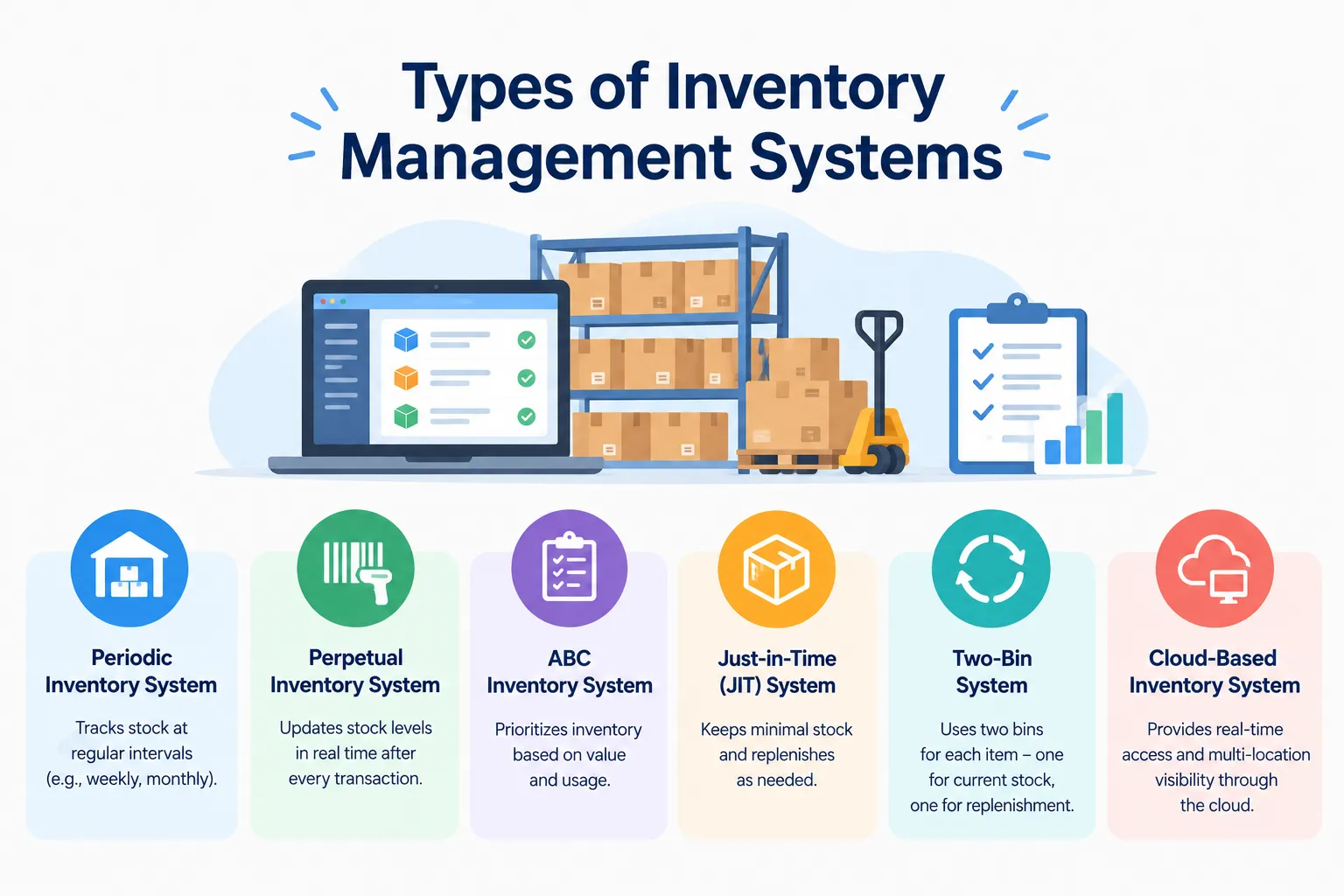
If you've ever searched for the types of inventory management systems and ended up more confused than when you started, you're not alone. The problem is that "types" can mean three or four different things, depending on who's writing. One article talks about how stock is counted, another about scanners and tags, and a third about software. This guide sorts all of that into clear groups, so you can see what each type does and which one suits your business. No jargon, just plain explanations.
Here’s how this guide was put together. We read through what the top-ranking guides cover, and we noticed most of them mix up those different meanings of "types". So here we've split things into four groups: how you count stock, which tools you use, which strategy you follow and how your software is set up. We've kept claims general and factual, and Firmity, our own product, gets only a short mention near the end.
What Is an Inventory Management System?
An inventory management system is simply the way you keep track of what you have, what's coming in and what's going out. It might be a notebook, a spreadsheet or a full software platform. The type you pick shapes your day-to-day, from how often you count stock to how quickly you spot a shortage. If you'd like the fundamentals first, our guide on what is inventory management covers them step by step.
The reason the type matters is that a method that works for ten products can fall apart at ten thousand. A small shop might get by with a weekly count, while a plant with spare parts across several sites needs updates the moment something moves. Getting the match right early saves a lot of rework later. Let's go through the groups one by one.
Group 1: Types by Counting Method
This is the most common way to sort inventory systems, and it's the one most people mean when they ask about "types". It comes down to a simple question: when do you update your stock numbers? You’ll find three common answers, and which one makes sense depends on how big you are and how fast your stock moves.
Manual Systems
Manual systems rely on paper, registers or a basic spreadsheet. Someone writes down what comes in and what goes out, and someone else checks it when needed. They're simple and cost almost nothing to start with, which is why so many businesses begin here. The catch is human error. Typos, missed entries and outdated sheets get harder to manage as your stock and team grow.
Example: A small workshop that keeps a notebook of tools and a spreadsheet of parts.
Periodic Systems
Periodic systems rely on regular physical counts, for example at the end of each week or month. Between counts, your numbers are really estimates, and the count is when you find out where you actually stand. That makes them a reasonable fit for small operations with limited transactions. The downside is the gap between counts, because you can run out of something before anyone notices.
Example: A small store that counts shelves at month-end and orders based on that count.
Perpetual Systems
Perpetual systems update stock records as things happen. Every receipt, issue or transfer is recorded when it takes place, so you can see current levels at any moment. That's very useful when volumes are high or stock is spread across locations. It does need discipline, since everyone must record movements properly, and it usually involves software.
Example: A campus store where every spare part issued to a technician is logged straight away.
Group 2: Types by Tool
The second meaning of "types" is about the tools you use to capture stock information. These aren't separate systems so much as ways of recording what's happening. Think of them as the hands and eyes of your system, whichever counting method you've chosen.
Spreadsheets and Paper
The classic starting point. They're flexible, familiar and free, and you can set them up in an afternoon. As your stock grows, though, they get slow, messy and easy to break. Two people editing the same sheet is how mistakes sneak in.
Barcode Systems
Barcode systems use a scanner to read a printed code on an item or shelf, then record the movement automatically. That removes a lot of typing, and typing is where many mistakes come from. They're a common companion to perpetual systems, because they make real-time updates practical. You'll need labels, scanners and a bit of setup time.
RFID Systems
RFID uses small tags that can be read by radio, without lining up a code with a scanner. That can make counting faster, especially for large numbers of items. It's usually a bigger investment than barcodes, so it tends to suit larger or higher-value operations. Just as with barcodes, it feeds a perpetual system instead of taking its place.
Not Sure Which Type Fits Your Stock?
Quick breather before we carry on. If you're already tracking stock across more than one site, a short conversation can help you work out whether you've outgrown spreadsheets. Firmity's team can look at what you're managing today, whether that's spare parts, consumables or purchase orders, and tell you what would help. Share what you're tracking, and they'll reply within 24 hours.
Group 3: Types by Strategy or Method
The third meaning is about strategy: the rules you use to decide what to order, when to order it and how to value it. You can mix these with any counting method or tool. They shape the decisions you make about stock far more than the way you write it down.
Just-in-Time (JIT)
JIT means you receive goods only when you need them, so very little sits on the shelf. That frees up money and storage space. It also needs very reliable suppliers, because one late delivery can stall your work. It suits predictable operations more than ones with sudden spikes.
ABC Analysis
ABC analysis sorts your items by value or importance. Category A holds the few items that matter most, B sits in the middle and C holds the many low-value items. You then give the closest attention to A and a lighter touch to C. That way a cheap bolt doesn’t get the same attention as a part your whole line depends on.
FIFO and Other Valuation Methods
FIFO, or first-in, first-out, assumes the oldest stock is used or sold first. It's popular for items that expire or go out of date. It's also a way of putting a value on your stock. The international accounting standard for inventories, IAS 2, allows FIFO or weighted average for interchangeable items and doesn't permit LIFO. Indian reporting follows its own standards, so confirm the details with your accountant.
Cross-Docking
Cross-docking moves goods straight from incoming vehicles to outgoing ones, with little or no storage in between. It's often mentioned for perishable goods that shouldn't sit around. It needs tight coordination between suppliers and deliveries. Most small businesses won't use it, but it's useful to know the term.
Group 4: Types by Software Setup
The fourth meaning is about how your software is built and delivered. Most businesses make their actual buying decision at this level, so it pays to take your time with it.
Single-Computer and Standalone Tools
Here we’re talking about anything from a simple spreadsheet to a small program that lives on one computer. Setting it up is easy and inexpensive, but passing information between people and sites gets clumsy. Not everyone sees the latest changes at the same moment. It’s at its best in a single location where only a few people enter data.
Cloud-Based Systems
Cloud-based systems run online, so your team can check and update stock from anywhere. They typically give you visibility across several locations and may support automatic reorder reminders based on rules you set. There’s no need to run or look after servers of your own.. You do need a reliable internet connection and a clear idea of what each plan includes.
ERP-Integrated Systems
Some inventory tools are part of a larger ERP, connected to finance, purchasing and other areas. That means your stock data flows into the rest of the business without retyping. It can be powerful, but it's usually a bigger project to set up than a standalone tool. It makes the most sense when you need those other areas connected too.
Types of Inventory Management Systems at a Glance
Type | How it works | Best for | Main drawback |
|---|---|---|---|
Manual | Paper or spreadsheet entries | Very small operations | Errors grow with size |
Periodic | Regular physical counts | Small stores with limited transactions | Numbers go stale between counts |
Perpetual | Records update as stock moves | Higher volumes or several locations | Needs discipline and usually software |
Barcode | Scanning to record movements | Teams that want fewer typing errors | Needs labels and scanners |
RFID | Radio tags read automatically | Larger or high-value stock | Higher setup cost |
JIT | Stock arrives only when needed | Predictable operations | Depends on reliable suppliers |
ABC analysis | Items ranked by value | Teams with a wide range of items | Needs regular review |
Cloud-based | Online access across sites | Multi-location teams | Needs internet and a clear plan |
Which Type Fits Your Business?
Here's a simple way to decide. Start with your size and speed: if you handle a few items and a handful of transactions a week, a manual or periodic setup may be enough for now. If stock moves daily or sits across several sites, a perpetual system with software will probably save you headaches. Then think about what you store, because spare parts, raw materials and finished goods each behave differently.
Next, think about who touches the stock. If several people record movements, you need something that keeps everyone on the same page. Finally, think about where you'll be in a couple of years, and avoid a setup you'll outgrow quickly. If you want to see tools side by side before deciding, our roundup of the top inventory management software in India is a useful next step.
How Firmity Fits In
Since you're comparing options, here's one in plain terms. Firmity's inventory software is a cloud-based platform from UFIRM Technologies that keeps stock, spare parts, purchase orders, vendor rate cards, goods receipts and a stock ledger in one place. Every site reports into the same system, so you get one view instead of one spreadsheet per location. It's built for facility-heavy businesses like plants, campuses and residential estates. If that's your world, it's worth a look, and if not, the guide above should still help you choose.
Common Mistakes When Choosing a System
The most common mistake is buying more than you need. A long feature list looks impressive, but you'll pay for features nobody uses. Another is skipping the trial, because a tool that looks good in a demo can feel clumsy with your own items. And the third is ignoring how it handles multiple sites, which is the thing that causes trouble later if you add a second location.
A smaller trap is forgetting your team. If the people recording stock find the system slow or confusing, they'll quietly go back to old habits, and your numbers will drift. So test it with the people who'll actually use it every day. A system that's slightly less powerful but gets used properly beats a fancy one that nobody trusts.
FAQs About Types of Inventory Management Systems
The three classic ones are manual, periodic and perpetual. Tools like barcodes and RFID, strategies like JIT and ABC analysis, and software setups like cloud-based systems sit around those three.
It depends on volume. For a small operation with few transactions, a manual or periodic setup can do the job, whereas a cloud-based perpetual system fits teams whose stock moves every day or is spread over several locations.
With periodic, your numbers only get refreshed when you carry out a physical count. Perpetual systems update them whenever stock moves, so you can see current levels at any time.A manual or periodic setup can work for a small operation with limited transactions, while a cloud-based perpetual system suits teams whose stock moves daily or sits across several locations.
Not really on their own. Barcodes and RFID are tools that support a system, and they're most often used alongside a perpetual one.
Author Bio

Syed Aadam
Syed Aadam is a software engineer with a Bachelor's and Master's in Information Technology with a specialization in Artificial Intelligence and Machine Learning. Having trained, and assisted in training foundational ML models for solving frontier scientific problems at the intersection of biodiversity and technology, Syed Aadam has been working to develop AI-enabled CMMS, ERP and CAFM softwares at Ufirm Technologies.
Talk to our team
Questions about facility management software? Leave your details and we'll get back to you within 24 hours.
More on Inventory Management
7 Best ERPNext Alternatives for Inventory in 2026 (Affordable Options for Indian Businesses)
Looking for ERPNext alternatives for inventory? Compare 7 budget-friendly stock management options and see which one fits your team best.
7 Best TallyPrime Alternatives in 2026 (Compared for Indian Businesses)
Looking for TallyPrime alternatives? Compare 7 accounting and ERP options for Indian businesses, with clear notes on who each one suits best.
What Is Inventory Management? Process, Types & Methods
What is inventory management? Learn how it works, the main types, techniques like ABC and FIFO, and common mistakes, with a simple reorder example.
