Guide
What Is Cloud-Based Payroll? Meaning, Benefits and How It Works
· 8 min read
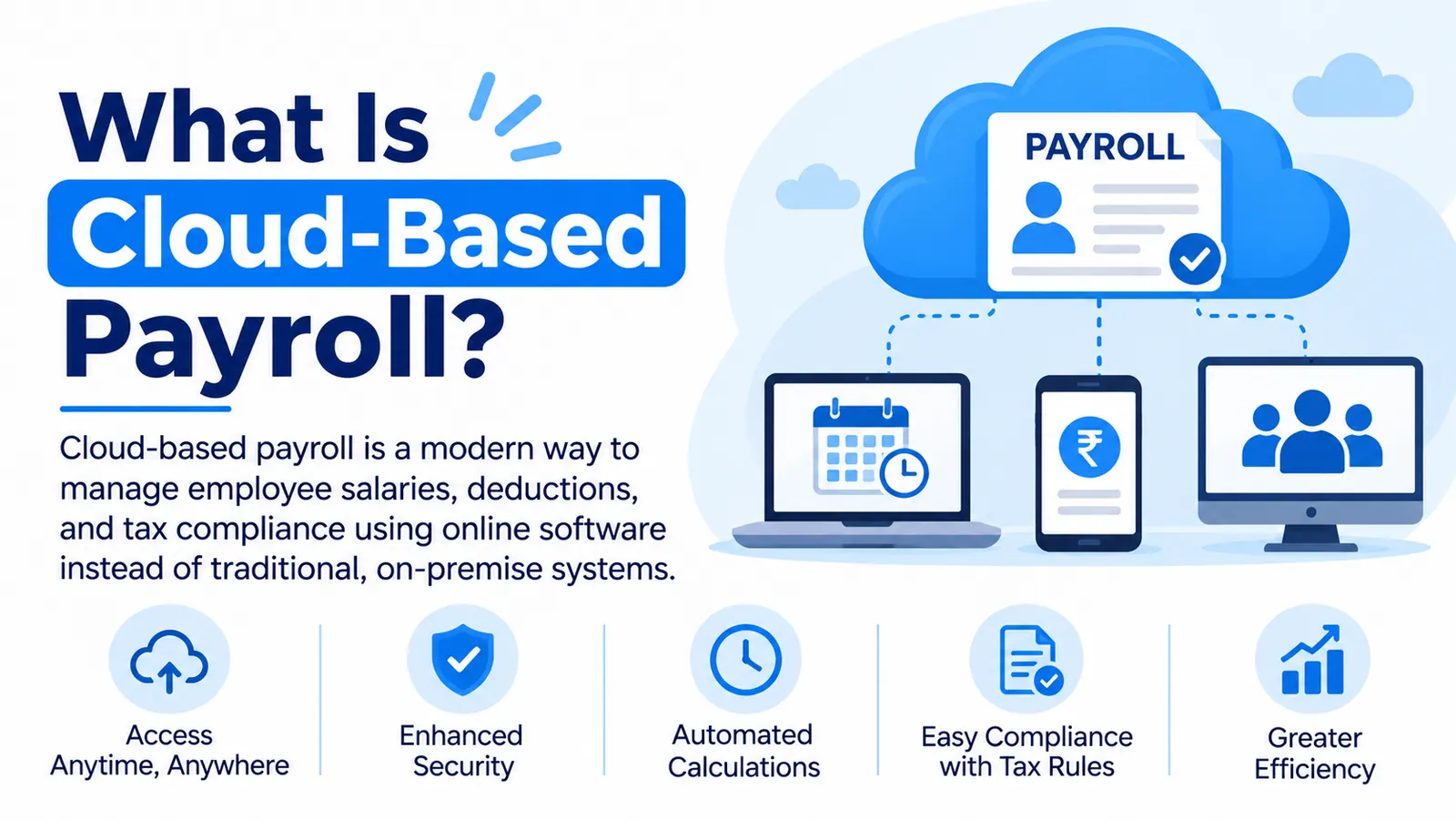
Cloud-based payroll is payroll software hosted online by a provider, so you run pay and payslips through a browser or app. Nothing needs installing on your own computers.
If you’ve heard the term and wondered whether it’s real change or just a new label, you’re not alone. In this guide, we’ll explain how it works, how it compares with other ways of running payroll, what it does well, where it falls short and how to choose. It’s one flavor of payroll software, and the cloud part simply changes where the software lives and who looks after it.
Cloud-based payroll in simple terms
Think about the difference between a document saved on one computer and a shared online document. The saved file only exists where you left it, and everyone needs their own copy. The online one lives in one place, updates for everybody and opens from any device. Cloud-based payroll works the same way: the software and your payroll data live with the provider, and you reach them through a browser or app.
The word “cloud” isn’t just marketing, either. The NIST definition of cloud computing describes software as a service as one of three service models, where you use a provider’s application running on its own infrastructure, and it lists broad network access among the core traits, meaning the service is reachable from many kinds of devices. Web-based payroll, online payroll and SaaS payroll are mostly different names for the same idea.
How cloud-based payroll works
A typical pay run follows five steps. The provider hosts the software and keeps it running, so your team’s job is mostly entering accurate data and approving the result.
Step | What happens | Who does it |
|---|---|---|
1. Add the basics | Employee details, salary structures and bank details are entered once | You or your HR team |
2. Bring in attendance and leave | Days worked, leave and overtime feed into the pay run | The system, from your records |
3. Calculate | Gross pay, deductions and net pay are worked out | The software |
4. Review and approve | You check the numbers and sign them off | Your payroll team |
5. Pay and share | Payment files, payslips and reports are produced | The software, with your approval |
Cloud vs on-premise vs outsourced payroll
Cloud-based payroll isn’t the only way to run payroll, so it helps to see the main alternatives side by side. The big question is who runs payroll and who looks after the software.
Approach | Who runs payroll | Who maintains the software | Control | Best for |
|---|---|---|---|---|
Cloud-based | Your team, using the provider’s hosted software | The provider | High: you decide and approve | Control without servers to manage |
On-premise | Your team, using software on your own servers | You, usually through IT | High, with more upkeep | Organizations with strict IT needs and capacity |
Outsourced | A provider runs payroll for you | The provider | Lower day to day | Teams that want to hand payroll over |
Cloud-based payroll sits in the middle: you stay in charge of decisions and approvals, but you don’t look after servers or install updates. Hybrid setups exist too, such as using a cloud tool while an accountant reviews or runs part of the process. The right choice depends on how much control you want and how much IT work you can take on.
Cloud-based is only one slice of the picture. There are other types of payroll software too, grouped by how they’re delivered, like cloud-based or on-premise, and by what they cover, from payroll-only tools to suites that sit inside a wider HR or ERP system. Standalone tools can be simpler, while suites save retyping between attendance, leave and payroll. Neither type is automatically better; each simply suits different setups. Which one fits depends on how many systems you already run and how much IT help you really have, so it pays to understand the full range before you start comparing products.
Key benefits of cloud-based payroll
Access is the big one. Because the software runs online, payroll teams can work from the office, from home or between sites, and approvers can sign off without sitting at a particular desk. Updates come from the provider instead of landing on your IT team, which is handy when rules or rates change. And because these tools are built to connect, attendance and HR data can flow in without anyone retyping it.
Cloud systems also tend to scale more gracefully. Adding people, locations or pay groups is usually a settings change, not a new server project. Employees often get a self-service view of their own payslips, which cuts the “can you resend that?” emails. Just remember that benefits depend on how the product is built, so test them in a demo, not on a brochure.
What cloud payroll usually includes
Most cloud payroll tools cover salary calculation, deductions, payslips, employee self-service, reports and some link to attendance or HR. Many add approvals, role-based access and bank payment files. The full feature checklist is a topic of its own, so here’s the short version: start with calculation, attendance links, approvals, payslips and reports, then add extras only if you’ll really use them.
Risks and limitations to know about
Cloud payroll isn’t perfect. It depends on an internet connection, so ask what happens if you can’t get online on pay day. You’re also trusting a provider with sensitive salary data, which makes privacy and access controls important. Costs are recurring, and extras like add-on modules can push the bill up. And if you ever leave, you’ll want to be able to export your data cleanly.
One more thing: automatic updates don’t take the responsibility off you. The provider keeps the software current, but you’re still accountable for paying people correctly and on time. Check which countries and rules the vendor supports, and keep someone on your team who understands the basics of how pay is worked out.
Is cloud payroll secure? Questions to ask a vendor
It can be, but that depends on the vendor’s controls and on how you use the system. Rather than taking “it’s secure” on trust, put these questions to every vendor on your shortlist.
Access: Can we set roles so people only see what they need?
Audit trail: Are changes to pay and approvals logged?
Backups: How is our data backed up and restored?
Data location: Where is our data stored, and does that fit our local rules?
Protection: How is data protected in storage and in transit?
Exit: Can we export all our data if we leave?
A good vendor will answer these plainly. Vague or defensive answers are your cue to keep looking.
Who should use cloud-based payroll?
It suits most teams that don’t want to run servers, but a few situations make it especially attractive. Use this table to see where you fit and what to check.
Team type | Why it suits | What to check |
|---|---|---|
Small teams | No servers to look after, quick to start | User limits and what’s included |
Growing businesses | Add people and sites without new infrastructure | How limits and plans change as headcount rises |
Shift-based or multi-site teams | Attendance and payroll can sit together across sites | Attendance links and site-level reports |
Remote teams | Payroll is reachable from anywhere | Strong access controls and approvals |
Multi-country teams | One platform for several countries, if supported | Whether each country’s rules are covered |
How to move to cloud payroll in 5 steps
Moving doesn’t need to be dramatic. Here’s a simple order that works for most teams.
List what you do today: who enters data, who approves and where attendance comes from.
Decide your must-haves: the few things the new tool has to do well.
Test with a real pay cycle: include awkward cases like joiners, leavers and unpaid leave.
Clean your data before you move it: employee records and salary structures should be accurate.
Run both once, then switch: compare results for one cycle before you retire the old method.
Most problems at this stage come from the same few habits, such as buying on price alone or skipping a real trial, which are the usual common mistakes when choosing payroll software. Slow down at the testing step and you avoid most of them.
Where does Firmity fit in?
Firmity is a cloud-based platform, and its payroll software is built around attendance. Attendance feeds straight into payroll, salary records sit on each employee’s master record, and leave and comp-off balances apply to deductions. You can run payroll across several properties from one platform, export payroll reports and use role-based access to control who sees what.
Firmity is also an affordable option, which helps when you’re weighing a subscription against other budget lines. It suits facility teams in manufacturing, education and residential estates, where attendance drives pay. If you need statutory details for your country, ask about them during a demo. To see it on your own pay cycle, get in touch through the contact page, and the team says it replies within 24 hours.
The bottom line
Cloud-based payroll is payroll software that lives with a provider and reaches you through a browser or app. It trades server headaches for a subscription, and it works best when you test it on a real pay cycle and ask the awkward questions up front. When you’re ready to compare, a roundup of the top payroll software is a handy next step.
FAQs : What is Cloud-based Payroll Software
It’s payroll software that a provider hosts online, so you use it through a browser or app instead of installing it yourself. The provider looks after the servers and updates, and your team enters data and approves each pay run.
Largely, yes. Cloud payroll, web-based payroll, online payroll and SaaS payroll are mostly different names for payroll software delivered over the internet. Vendors sometimes use them loosely, so check what’s actually included.
It can be, but it depends on the vendor’s controls and how you use the system. Ask about access roles, audit trails, backups and data location, and keep strong permissions and passwords on your own side.
With cloud payroll, your team runs payroll using hosted software and keeps day-to-day control. With outsourced payroll, a provider does the processing for you. Cloud gives you more control, and outsourcing takes more work off your plate.
Author Bio

Syed Aadam
Syed Aadam is a software engineer with a Bachelor's and Master's in Information Technology with a specialization in Artificial Intelligence and Machine Learning. Having trained, and assisted in training foundational ML models for solving frontier scientific problems at the intersection of biodiversity and technology, Syed Aadam has been working to develop AI-enabled CMMS, ERP and CAFM softwares at Ufirm Technologies.