CMMS
CMMS vs EAM: What’s the Difference ?
· 7 min read
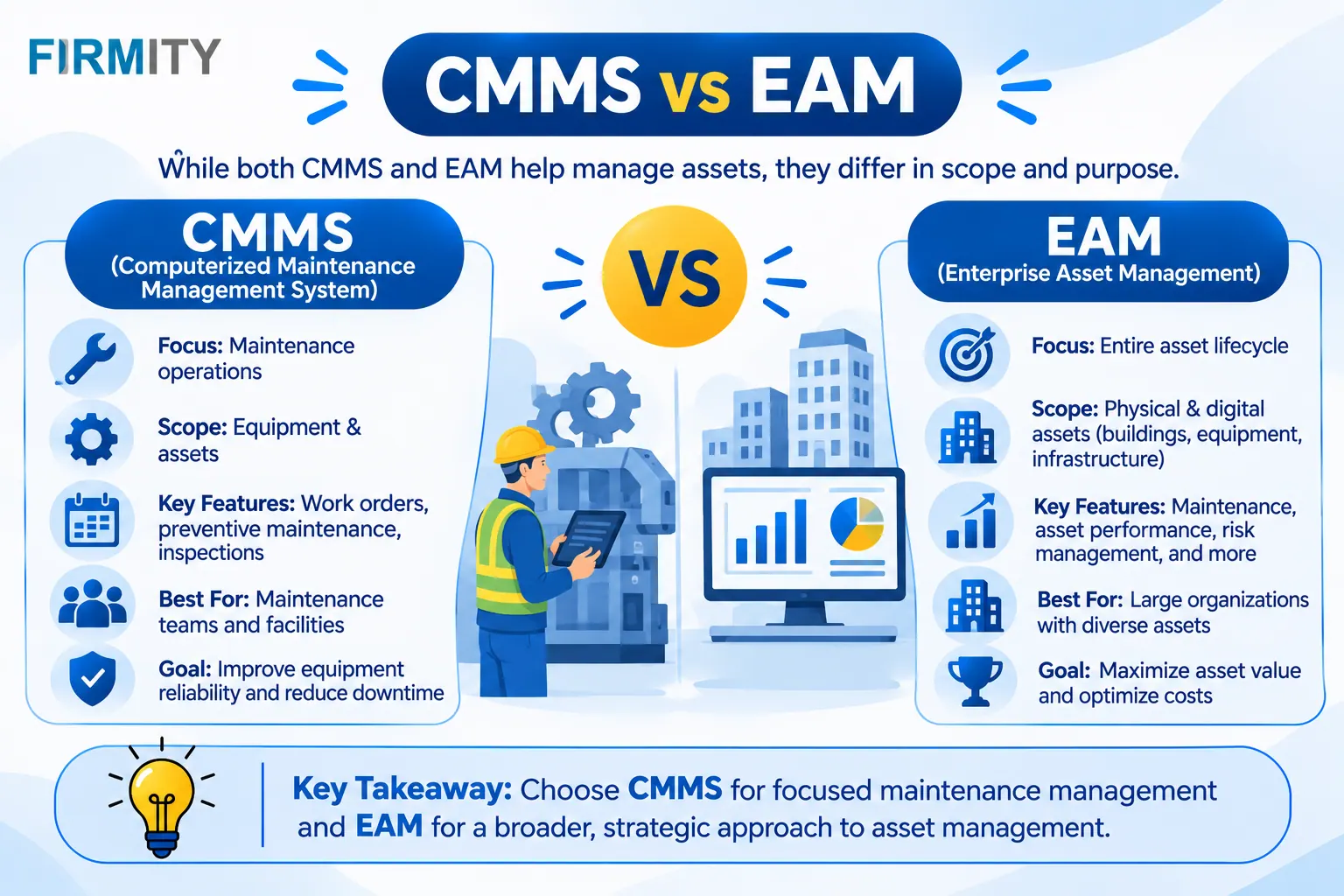
CMMS vs EAM comes down to scope: a CMMS runs maintenance work, while an EAM manages the whole asset lifecycle. Most EAM systems include CMMS features.
If you’re deciding between the two, the confusing part is that vendors use both labels loosely. In this guide, we’ll explain each in plain English, compare them side by side, show you the signs that you’ve outgrown a simple system and help you pick the right fit for your own team. No jargon, no pressure.
CMMS and EAM Definition
A computerized maintenance management system, or CMMS, is the tool your maintenance team lives in. It keeps work orders, preventive schedules, asset records and spare parts in one place, so jobs get done on time and history doesn’t vanish when someone leaves. Its big question is, “How do we keep this equipment running?”
Enterprise asset management, or EAM, zooms out. It covers the same maintenance work, then adds everything around the asset’s whole life: buying it, tracking its cost, deciding when to repair or replace it and finally retiring it. Its big question is closer to, “Is this asset worth keeping, and what does that mean for the budget?”
Here’s a simple way to picture it. A CMMS is the workshop where equipment gets looked after. An EAM is the whole estate office, with the workshop as one room inside it.
CMMS vs EAM at a glance
Short on time? This table shows the main differences. Remember that the lines blur in real products, so treat it as a guide, not a rulebook.
Dimension | CMMS | EAM |
|---|---|---|
Main job | Run and track maintenance work | Manage assets across their whole life |
Scope | The maintenance team, often one or a few sites | The whole organization, often many sites |
Typical users | Technicians, supervisors, maintenance managers | Maintenance, finance, procurement, operations and compliance |
Lifecycle coverage | Mostly the maintenance stage | Planning, purchase, operation, maintenance and disposal |
Financial depth | Maintenance and parts costs | Capital planning, depreciation and repair-or-replace decisions |
Integrations | Usually lighter | Typically connected with finance and ERP systems |
Setup effort | Usually quicker and simpler | Usually longer, with several departments involved |
Relative cost | Usually lower | Usually higher |
Best for | Keeping equipment running day to day | Governing a large, valuable asset portfolio |
What a CMMS covers
A CMMS handles the daily business of maintenance. That means work orders from request to closure, preventive maintenance schedules that repeat on their own, asset records with service history, spare parts tracking and reports on what’s overdue or done. Technicians can usually update jobs from a phone, so records get written as work happens. For many facility teams, that’s exactly the right amount of system.
What an EAM adds
An EAM keeps all of that and widens the view. It typically adds purchasing and procurement, contracts and warranties, depreciation and capital planning, compliance and audit support, and visibility across departments such as finance and operations. It also tends to connect with other enterprise systems. The goal shifts from keeping things running to deciding how each asset should be managed over its entire life.
If you like a formal frame of reference, the ISO 55000 standard defines the vocabulary and principles of asset management and says it applies to all types of assets and all sizes of organization. It’s about getting more from your assets across their lifecycle, not about any one software category, which is a handy reminder that EAM is an approach as much as a product.
Where CMMS and EAM overlap
In real life, the line is blurry. Most EAM systems contain a full maintenance module, so they can do what a CMMS does and more. Meanwhile, modern CMMS platforms have picked up things that used to be EAM-only, like inventory, vendor management or cost reporting. Vendors also use the labels loosely, so one company’s CMMS can look a lot like another’s EAM.
That’s why it helps to see both as points on a spectrum, sitting inside the wider family of types of asset management software. Judge a tool by what it actually does for your team, not by what it’s called on the website.
Signs you’ve outgrown a CMMS
A CMMS is often all you need, but a few signs suggest you’re stretching it. If several of these sound familiar, it’s worth looking at broader tools.
Several sites, and finance wants a say: asset decisions are no longer just a maintenance matter.
You need capital planning: depreciation, budgets and repair-or-replace decisions matter to you.
Many departments touch assets: procurement, finance and operations all need the same records.
Compliance is a bigger deal: you need stronger audit trails and reporting across the business.
Integration is a must: asset data has to flow into your finance or ERP systems.
Which should you choose?
Match the tool to your situation, not the other way around. Here’s a quick guide to the usual fits.
Your situation | Likely fit | Why |
|---|---|---|
One site and a lean team | CMMS | Quick to set up and covers daily maintenance |
Several facilities with inventory, vendors and expenses to track | CMMS with ERP-style modules | You need more than work orders, but not a full enterprise rollout |
Asset-intensive business with capital planning | EAM | Lifecycle, finance and compliance matter as much as repairs |
Tight budget or timeline | CMMS | A smaller scope means a quicker, cheaper start |
Be honest about who’ll actually use the system. A powerful EAM that technicians avoid is worse than a simple CMMS they use every day. If most of the pain is in maintenance execution, start there, and add the wider tools when the business really asks for them.
Can you start with a CMMS and grow later?
Often, yes, and it’s a sensible path. Many teams start with a CMMS, get their asset data and habits in order, and only reach for heavier tools if the business demands it. What matters is portability. Ask whether you can export your asset records and service history, and whether the vendor can add modules as you grow. If you’re still shortlisting, a comparison of the top CMMS software shows which tools leave room to expand.
Cost and implementation
An EAM usually costs more and takes longer to roll out, simply because the scope is bigger. More departments are involved, more processes change and it often needs to connect with finance systems and other ERP software. A CMMS has a narrower job, so it’s typically quicker and cheaper to get going.
We’ve left price tags and timelines out on purpose, because published figures vary wildly between vendors and sources. The reliable way to compare is to give every vendor the same brief, covering your sites, users and must-have modules, and ask for a written quote and a realistic rollout plan.
Where does Firmity fit in?
If you’re somewhere in the middle, Firmity’s CMMS software is worth a look. Work orders carry an audit trail, preventive maintenance runs on recurring cycles you set by day, week or month, and technicians scan a QR code to open a task, complete the checklist and attach photo evidence. Dashboards show total, completed, overdue and actionable work orders across your sites.
Alongside that, Firmity’s asset management software gives each asset one record with its category, location, status, value and ownership type, plus service due dates, warranty and annual maintenance contract expiry, movement history and linked spare parts. Inventory and vendor modules handle purchase orders and goods receipts, and expense approvals keep spending in check.
The bottom line
A CMMS keeps equipment running, and an EAM helps you manage assets across their whole life. Most teams don’t need the bigger system on day one, so start with the tool that fixes your biggest headache and be ready to grow. Test any shortlist against one real job from your own site before you commit.
Also Read
FAQs : Difference Between CMMS and EAM
Scope. A CMMS manages maintenance work, like work orders, schedules and spare parts. An EAM manages assets across their whole life, adding things like procurement, financial planning, compliance and cross-department visibility.
Most EAM systems include maintenance management features, so they can do what a CMMS does and more. The reverse isn’t true, since many CMMS tools don’t cover lifecycle and financial management.
Usually a CMMS. It’s simpler, quicker to set up and usually costs less. An EAM tends to be overkill unless your asset portfolio is complex or several departments need to work from the same records.
Sometimes, but it depends on the platform. Some CMMS tools add inventory, vendor and cost modules over time. Check what’s available, how data moves between modules and whether the vendor supports your growth plans.
Author Bio

Syed Aadam
Syed Aadam is a software engineer with a Bachelor's and Master's in Information Technology with a specialization in Artificial Intelligence and Machine Learning. Having trained, and assisted in training foundational ML models for solving frontier scientific problems at the intersection of biodiversity and technology, Syed Aadam has been working to develop AI-enabled CMMS, ERP and CAFM softwares at Ufirm Technologies.